4G+ AIRHOME 710 s odnímatelnými anténami 4G+
Nebyly nalezeny žádné položky.
Nebyly nalezeny žádné položky.
Všechny otázky
4G+ AIRHOME 710 s odnímatelnými anténami 4G+
Nebyly nalezeny žádné položky.
Nebyly nalezeny žádné položky.
Jak mohu obnovit tovární nastavení routeru? (Tlačítko Reset)
Někdy se může stát, že vaše zařízení nefunguje správně a nemáte přístup k internetu. V takovém případě doporučujeme obnovit tovární nastavení zařízení a poté jej v případě potřeby aktualizovat.
Máte na výběr ze dvou způsobů: zařízení můžete obnovit stisknutím tlačítka pro obnovení nebo prostřednictvím webového rozhraní.
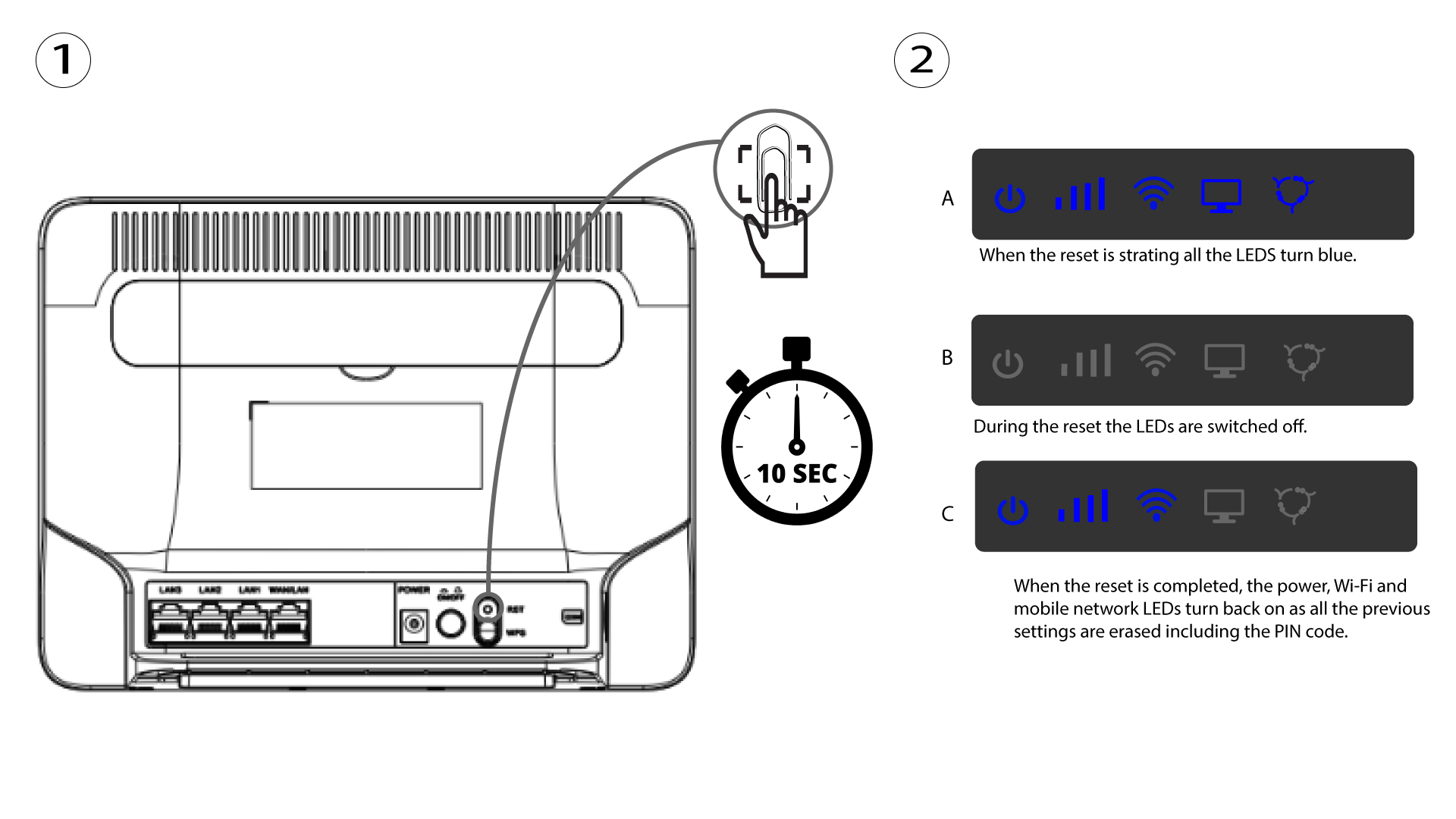
PŘÍPAD 1: Tlačítko reset.
K tomu vložte do otvoru kancelářskou sponku a stiskněte tlačítko reset. Tlačítko reset držte stisknuté po dobu 10 sekund. LED diody zhasnou switch a opět se rozsvítí.