
4G+ AIRSPOT 510 WLAN-Hotspot
Keine Artikel gefunden.
Keine Artikel gefunden.
Alle Fragen
4G+ AIRSPOT 510 WLAN-Hotspot
Keine Artikel gefunden.
Keine Artikel gefunden.
Wie kann ich meinen PIN-Code deaktivieren?
Sobald Sie Ihre SIM-Karte eingelegt und den PIN-Code über den LCD-Bildschirm des Mi-Fi eingegeben haben, wird der PIN-Code automatisch deaktiviert.
Sie können anhand der folgenden Schritte überprüfen, ob der PIN-Code deaktiviert ist:
1. Rufen Siedie Weboberfläche auf
Stellen Sie eine Verbindung zur Web-Benutzeroberfläche her .
2Zu den SIM-PIN-Einstellungen navigieren
Klicken Sie auf „Internet-Einstellungen“ und wählen Sie anschließend „SIM-Karten-PIN“ aus .
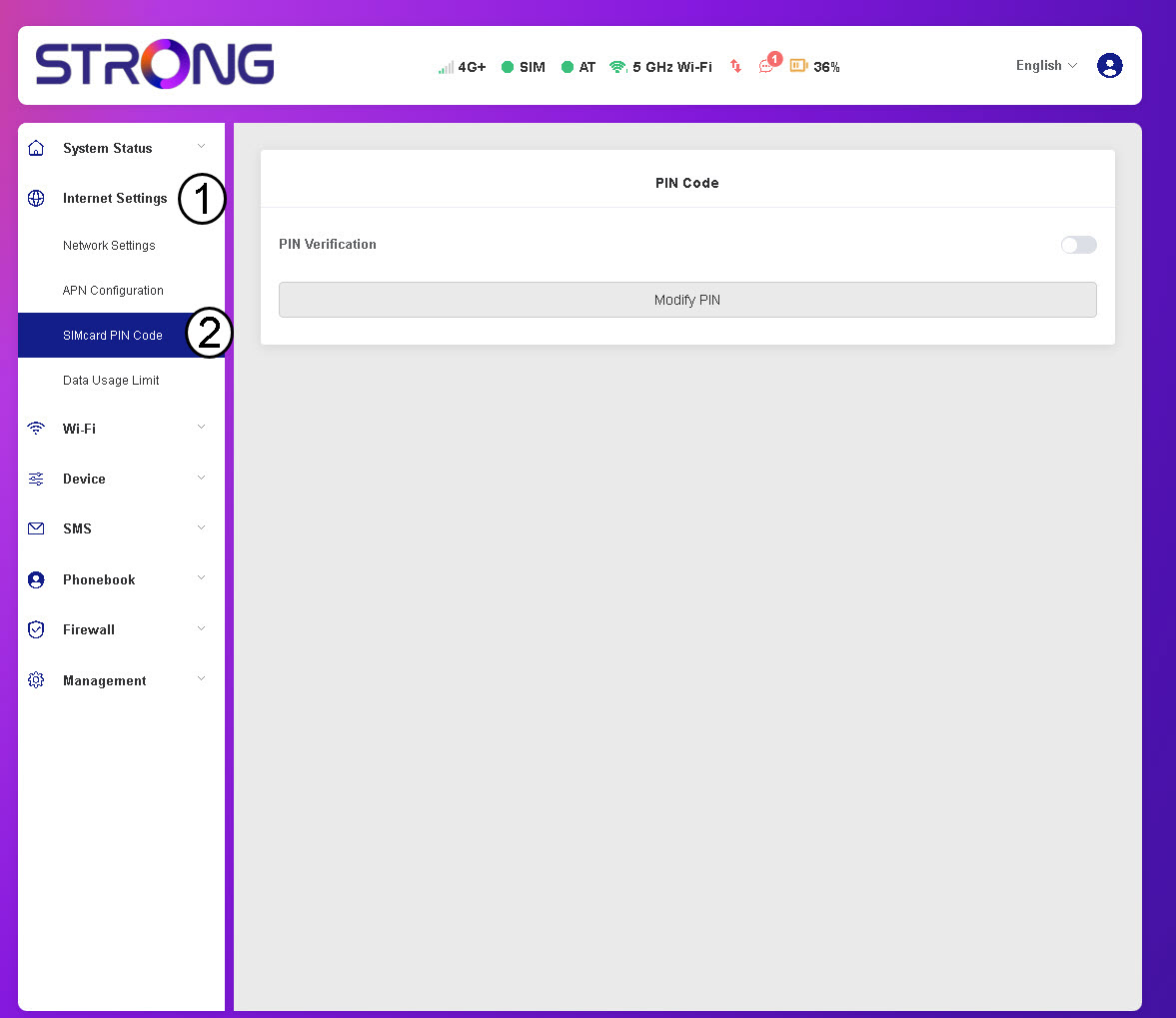
3. PIN-Status prüfen
Vergewissern Sie sich, dass der Schalter für die PIN-Überprüfung ausgegraut ist, was bedeutet, dass die PIN-Sperre deaktiviert ist.
