
4G+ AIRSPOT 510 Mobilni Wi-Fi
Nema pronađenih stavki.
Nema pronađenih stavki.
Sva pitanja
4G+ AIRSPOT 510 Mobilni Wi-Fi
Nema pronađenih stavki.
Nema pronađenih stavki.
Kako mogu promijeniti administratorsku lozinku?
1 Pristup web sučelju
Za pristup web sučelju pogledajte Kako pristupiti web sučelju?
2. Idite na Postavke lozinke
U odjeljku Upravljanje kliknite Postavke sustava i Promijeni lozinku .
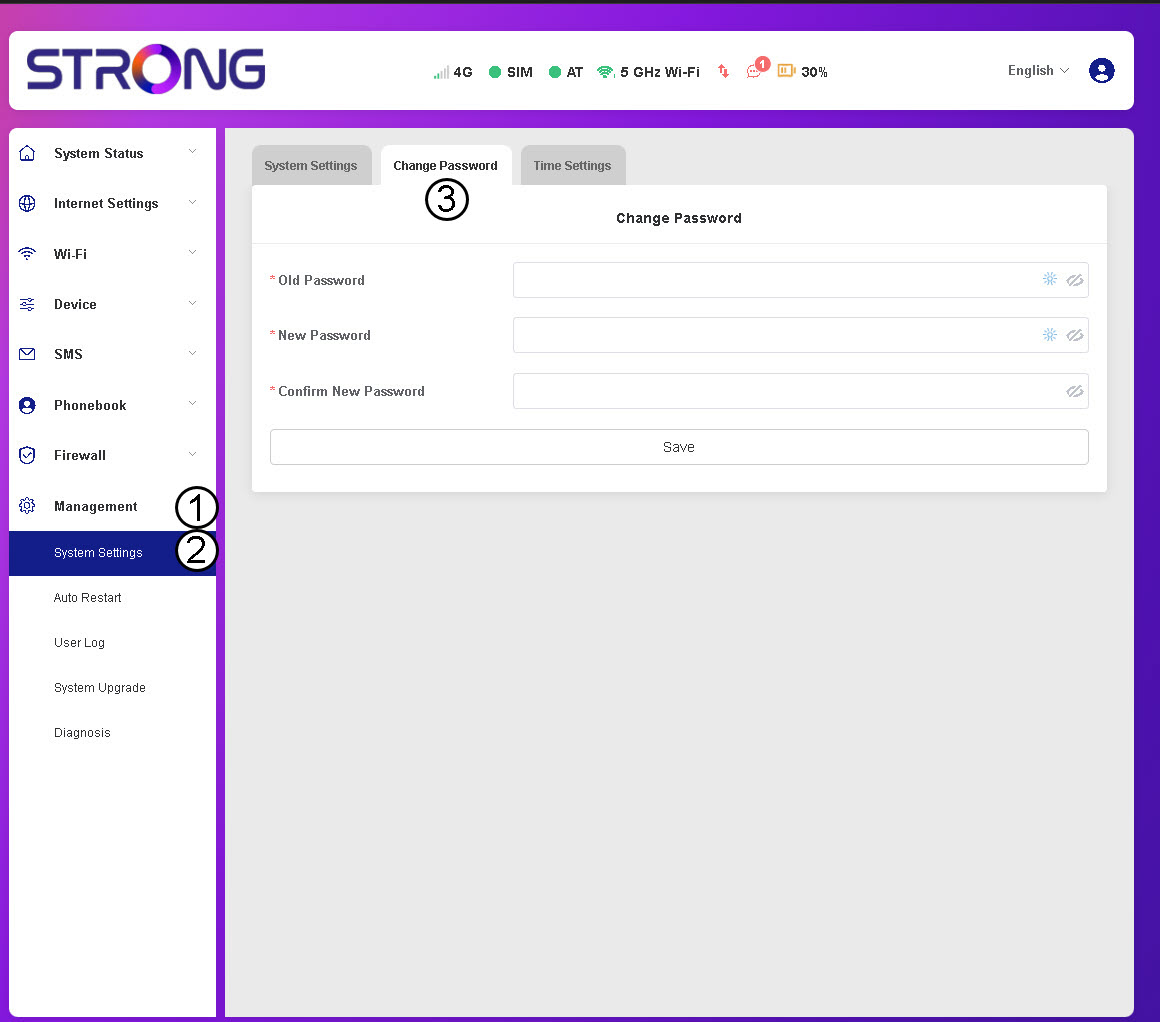
3 Unesite podatke o lozinki
Zatim unesite sljedeće podatke prije nego što kliknete Spremi:
- Stara lozinka : Unesite svoju trenutnu lozinku.
- Nova lozinka: Unesite lozinku koja sadrži najmanje 8 znakova i uključuje kombinaciju velikih slova, malih slova, brojeva i posebnih znakova. Dopušteni su samo sljedeći posebni znakovi: @$%*&.
- Potvrdite novu lozinku: Unesite istu lozinku kao u prethodno polje.


UPOZORENJE: Ako ste zaboravili trenutnu lozinku, morat ćete resetirati uređaj na tvorničke postavke.