
4G+ AIRSPOT 510 Mobilni Wi-Fi
Nema pronađenih stavki.
Nema pronađenih stavki.
Sva pitanja
4G+ AIRSPOT 510 Mobilni Wi-Fi
Nema pronađenih stavki.
Nema pronađenih stavki.
Koju vrstu SIM kartice mogu koristiti u svom ruteru?
Prije uključivanja uređaja, u utor za SIM karticu 4G PORTABLE HOTSPOT 900 potrebno je umetnuti nano SIM karticu.
Slijedite korake na donjoj ilustraciji:
- Uzmite svoju nano SIM karticu.
- Skinite stražnji poklopac da biste vidjeli bateriju i izvadite je.
- Umetnite SIM karticu.
- Stavite bateriju i stražnji poklopac i switch na uređaju.
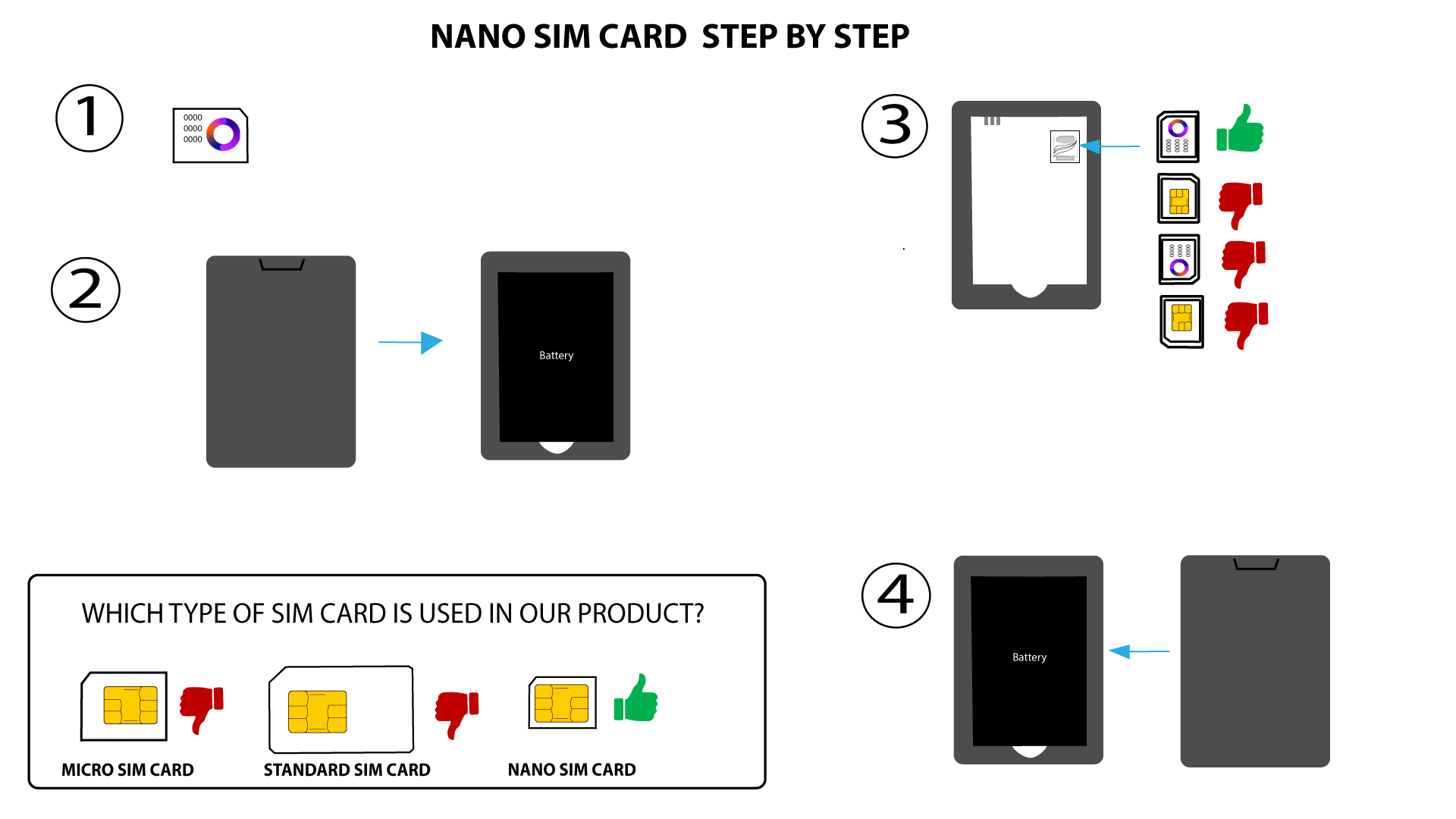

UPOZORENJE: Ako uređaj ne prepozna vašu SIM karticu, dvaput provjerite je li umetnuta u ispravnom smjeru. Ako koristite adapter, provjerite je li potpuno umetnut.