5G AIRHOME 1050 | Wi-Fi 6
Nem találtunk tárgyakat.
Nem találtunk tárgyakat.
Minden kérdés
5G AIRHOME 1050 | Wi-Fi 6
Nem találtunk tárgyakat.
Nem találtunk tárgyakat.
Hogyan módosíthatom az admin jelszót?

Figyelem: kérjük, vegye figyelembe, hogy az adminisztrátori felhasználónév nem módosítható. Csak a jelszót lehet megváltoztatni.
1. Csatlakozzonaz eszközhöz
Az admin jelszó frissítéséhez csatlakoznia kell a készülék Wi-Fi-hálózatához.

2. Nyissa mega webes felhasználói felületet
Ezután írja be a böngészőjébe a következő IP-címet: 168.0.1.

3Bejelentkezés
Be kell írnia a felhasználónevet és a jelszót. Ezután kattintson a „Bejelentkezés” gombra.

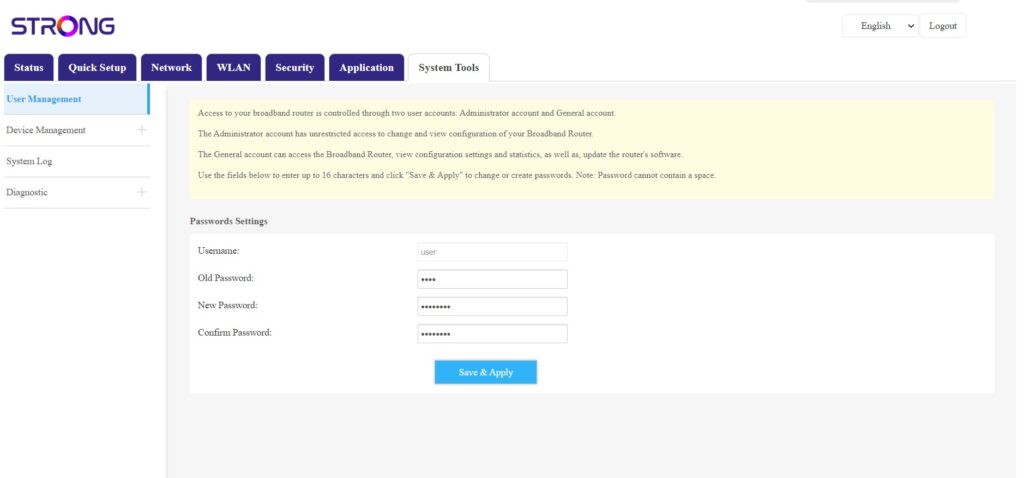
4. Felhasználókezelés
Miután ezt elvégezte, kattintson a „Rendszereszközök” és a „Felhasználókezelés” menüpontokra
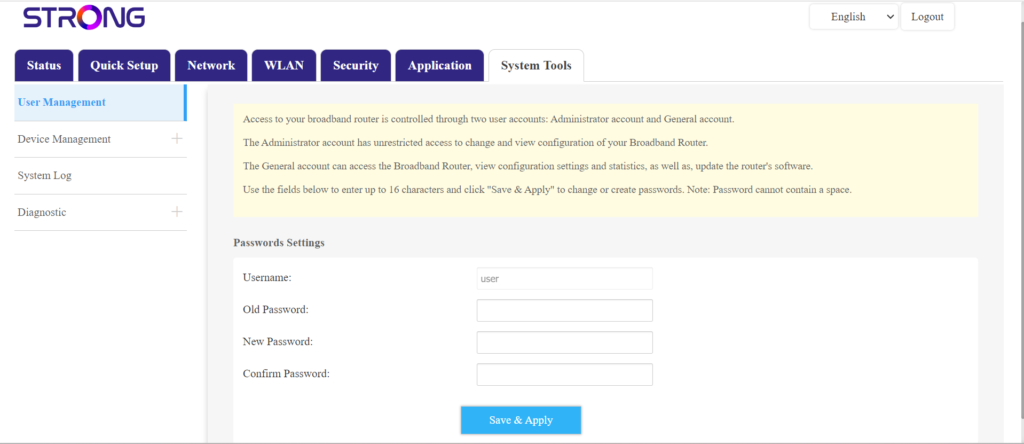
5. Jelszó módosítása
A „Mentés és alkalmazás” gombra kattintás előtt töltse ki a mezőket a következő adatokkal:
- Régi jelszó: Írja be azt a jelszót, amelyet a webes felhasználói felülethez való csatlakozáshoz használt.
- Új jelszó: Adjon meg egy új jelszót a webes felhasználói felülethez való csatlakozáshoz.
- Jelszó megerősítése: Írja be ugyanazt a jelszót, mint az „Új jelszó” mezőben.