ATRIA Wi-Fi 6 Mesh System 3000 (2-pakning)
Alle spørsmål
ATRIA Wi-Fi 6 Mesh System 3000 (2-pakning)
Hvordan bruker jeg Atriene Mesh App?
Hvordan bruker jeg AtriaMesh-appen?
1 Atrier Mesh App
Download the application for smartphone "ATRIA MESH" on the App Store or the Google Play Store.

2 legitimasjonsbevis
Deretter må du være koblet til Wi-Fi-en til Mesh med smarttelefonen din, og logg deretter inn på appen med påloggingsinformasjonen din, som skal være « admin » og « admin » hvis du ikke har endret den.

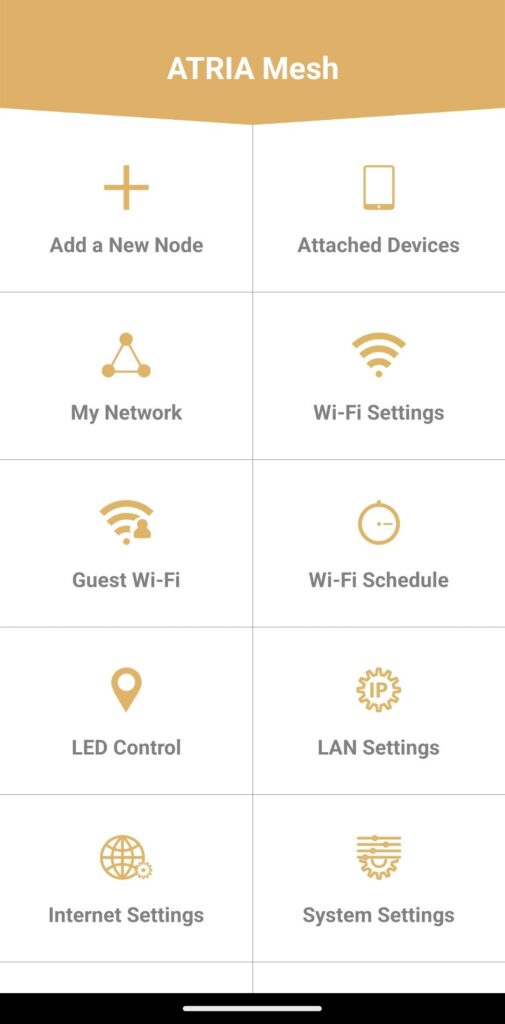
3 Hovedmeny
Nå er du på hovedsiden.
• Legg til en ny node: Der du kan legge til en ny Mesh enhet til din Mesh Nettverk.
• Tilkoblede enheter: Her kan du sjekke hvilke enheter som er koblet til Mesh Nettverk.
• Mitt nettverk: Der du kan sjekke alle Mesh enheter koblet til din Mesh Nettverk.
• Wi-Fi-innstillinger: Her kan du redigere og endre SSID-en (Wi-Fi-nettverksnavnet) og passordet til Wi-Fi-nettverket ditt. Mesh Nettverk.
• Gjeste-Wi-Fi: Her kan du sette opp og konfigurere et 2,4 GHz eller 5 GHz gjeste-Wi-Fi.
• Wi-Fi-plan: Her kan du planlegge en tidsperiode for aktivering av Wi-Fi-nettverket ditt.
• LED-kontroll: Her kan du slå PÅ eller AV LED-ene på Mesh enhet.
• LAN-innstillinger: Her kan du aktivere eller deaktivere DHCP.
• Internett-innstillinger: Her kan du konfigurere en DHCP-tilkobling, en manuell DNS, en PPPoE og sette opp en statisk IP-adresse.
• Systeminnstillinger: Her kan du endre administratorbrukernavnet og passordet for å få tilgang til appen.