
Mobilne Wi-Fi 4G+ AIRSPOT 510
Nie znaleziono żadnych elementów.
Nie znaleziono żadnych elementów.
Wszystkie pytania
Mobilne Wi-Fi 4G+ AIRSPOT 510
Nie znaleziono żadnych elementów.
Nie znaleziono żadnych elementów.
Jak wyłączyć kod PIN?
Po włożeniu karty SIM i wprowadzeniu kodu PIN za pomocą ekranu LCD urządzenia Mi-Fi kod PIN zostanie automatycznie dezaktywowany.
Możesz sprawdzić, czy kod PIN jest wyłączony, wykonując poniższe czynności:
1. Wejdźdo interfejsu internetowego
Połącz się z interfejsem użytkownika w sieci.
2Przejdźdo ustawień kodu PIN karty SIM
Kliknij opcję „Ustawienia internetowe”, a następnie wybierz opcję „Kod PIN karty SIM”.
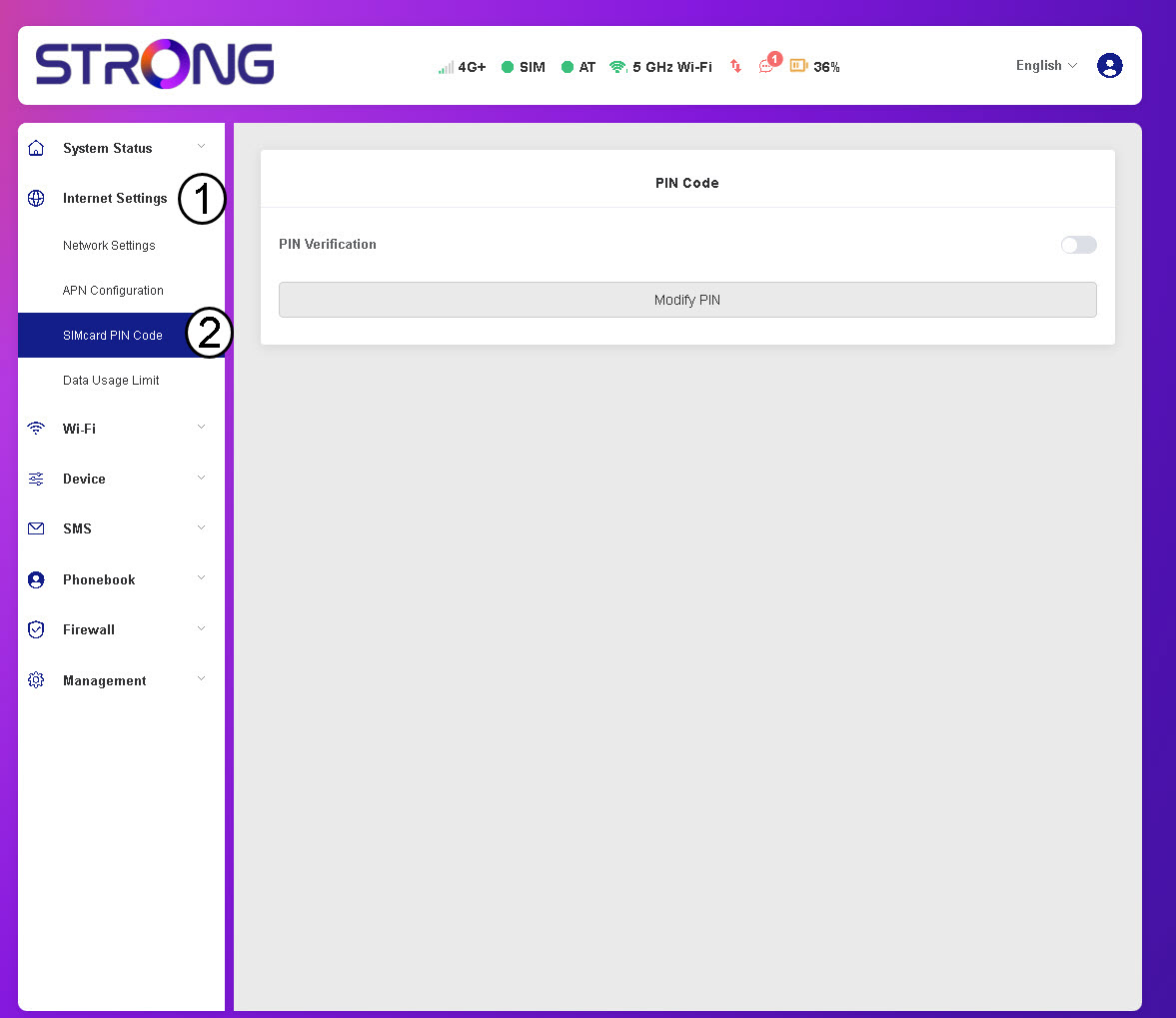
3. Sprawdźstatus kodu PIN
Sprawdź, czy przełącznik weryfikacji kodu PIN jest wyszarzony, co oznacza, że kod PIN jest wyłączony.
