4G AIRHOME 310 z odłączanymi antenami 4G
Wszystkie pytania
4G AIRHOME 310 z odłączanymi antenami 4G
Co mogę zrobić w interfejsie użytkownika na stronie internetowej?
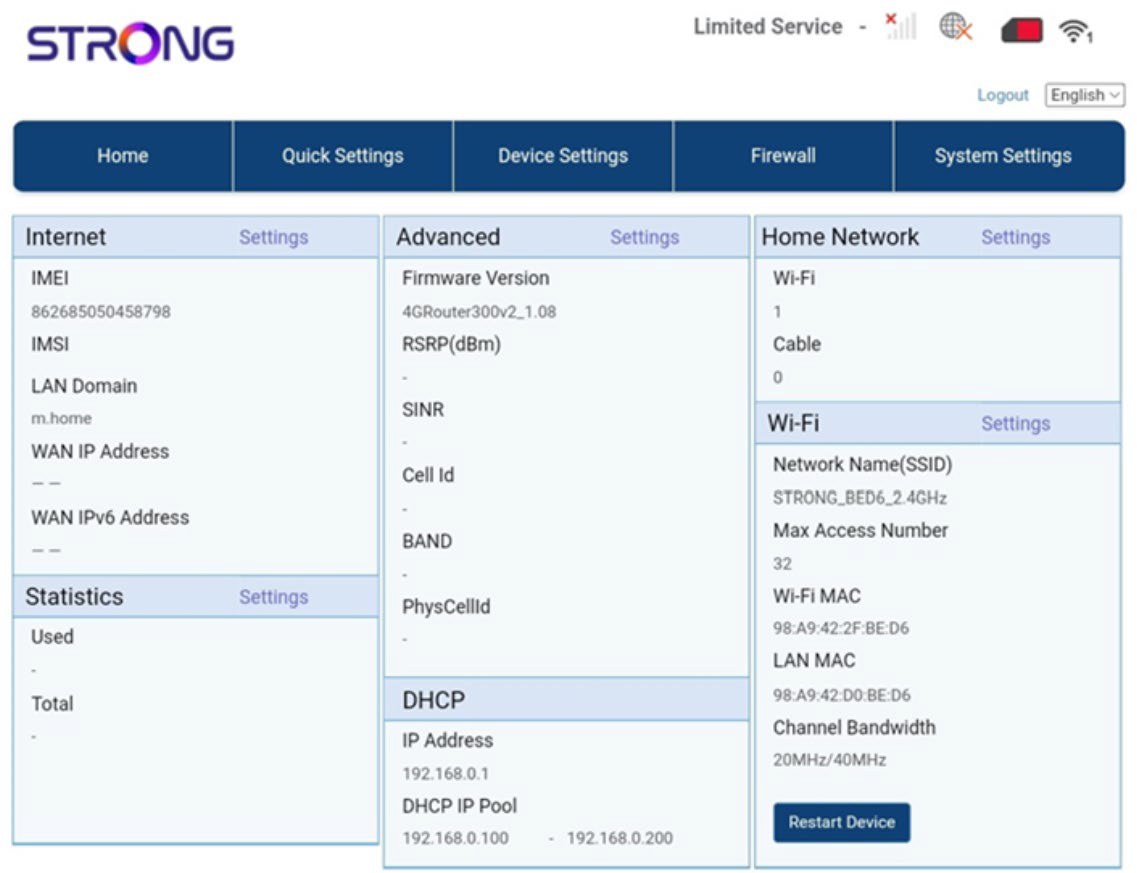
Interfejs użytkownika strony internetowej podzielony jest na 5 sekcji:
• Strona główna: tutaj możesz sprawdzić najważniejsze informacje dotyczące routera, takie jak stan połączenia internetowego, wersja oprogramowania sprzętowego, adres IP, dane o sieci Wi-Fi i sieci domowej itp.
• Szybkie ustawienia: tutaj możesz edytować identyfikator SSID i hasło.
• Ustawienia urządzeń: tutaj możesz sprawdzić liczbę podłączonych urządzeń, zarządzać ustawieniami adresów IP, kodami PIN, ustawieniami anteny, ustawieniami Wi-Fi, ustawieniami internetowymi itp.
• Zapora sieciowa: tutaj możesz skonfigurować parametry bezpieczeństwa.
• Ustawienia systemowe: tutaj możesz zaktualizować oprogramowanie, zrestartować urządzenie lub edytować ustawienia.
Ponadto możesz również sprawdzić stan sieci Wi-Fi, sieci komórkowej oraz transferu danych.