
Dvoupásmový Repeater 1200
Nebyly nalezeny žádné položky.
Nebyly nalezeny žádné položky.
Všechny otázky
Dvoupásmový Repeater 1200
Nebyly nalezeny žádné položky.
Nebyly nalezeny žádné položky.
Jak se připojím k síti WPS?

UPOZORNĚNÍ: K nastavení připojení k síti Wi-Fi mezi zařízením repeater a vaším internetovým box/routerem můžete použít funkci WPS.
1. Aktivujtefunkci WPS na Repeater
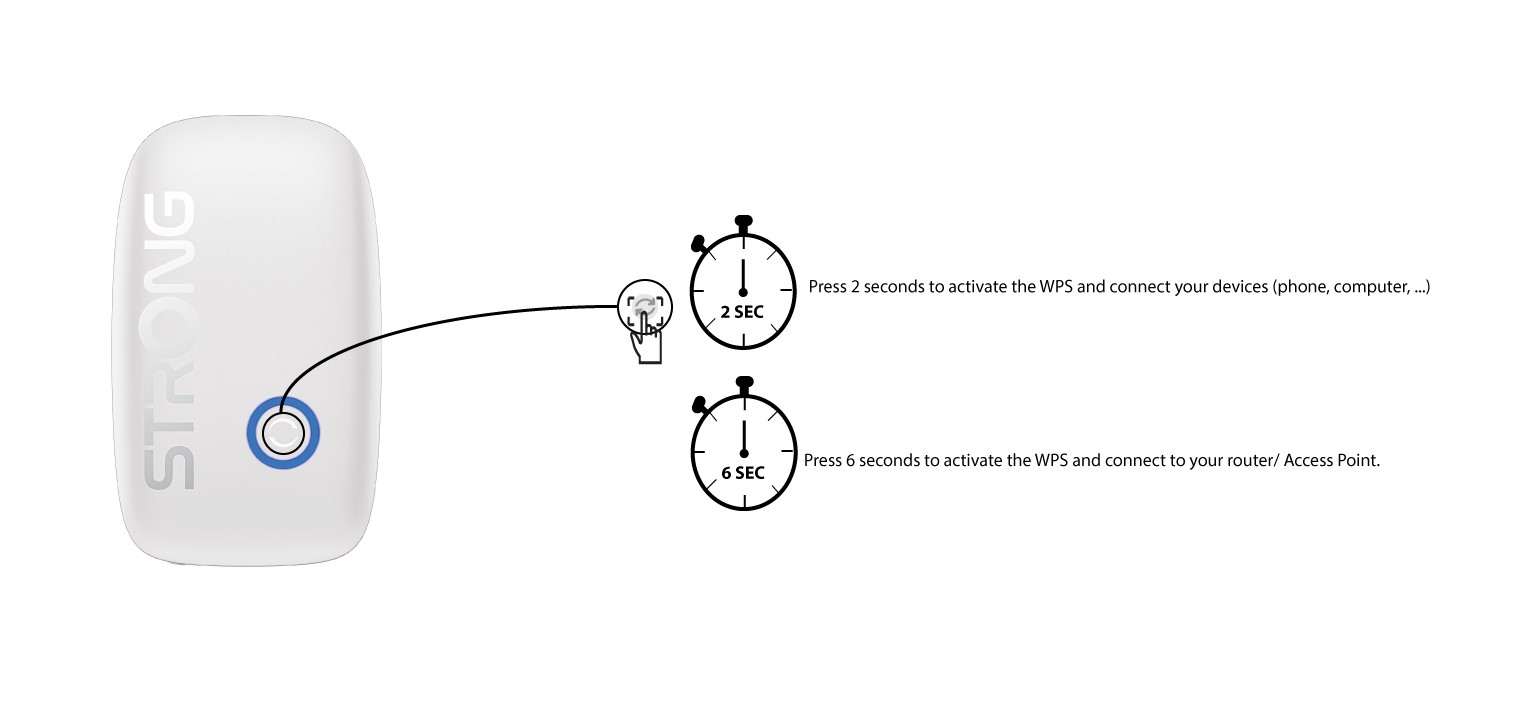
Chcete-li aktivovat funkci WPS, stiskněte tlačítko umístěné na přední straně zařízení repeater:
- Chcete-li připojit počítač pomocí funkce WPS, stiskněte tlačítko WPS na 2 sekundy
- Chcete-li připojit router nebo přístupový bod, stiskněte tlačítko WPS na 8 sekund.
2. Zapnětefunkci WPS na svém routeru
Stiskněte tlačítko WPS na vašem internetovém box/routeru, aby se k němu připojil repeater . Tlačítko WPS je obvykle označeno dvěma šipkami.