
Dvoupásmový Repeater 1200
Všechny otázky
Dvoupásmový Repeater 1200
Po nastavení mého repeater se nemohu přihlásit do webového uživatelského rozhraní (http://setup.strong). Proč?

Upozornění: Obvykle se po dokončení nastavení nelze připojit k webovému uživatelskému rozhraní, protože se změnily přihlašovací údaje. Po dokončení nastavení se totiž vytvoří dvě sítě Wi-Fi. Abyste se mohli připojit k webovému uživatelskému rozhraní, musíte se připojit k jedné z těchto sítí.
Pro přístup k webovému uživatelskému rozhraní postupujte podle níže uvedeného postupu.
1. Připojte sek Repeater
Je třeba se připojit k síti „ repeater “ pomocí kabelu RJ45 nebo se připojit k jedné ze sítí Wi-Fi, které byly vytvořeny po dokončení konfigurace.

2. Otevřetewebové rozhraní
Zadejte adresu URL pro přístup k webovému uživatelskému rozhraní ve vašem prohlížeči

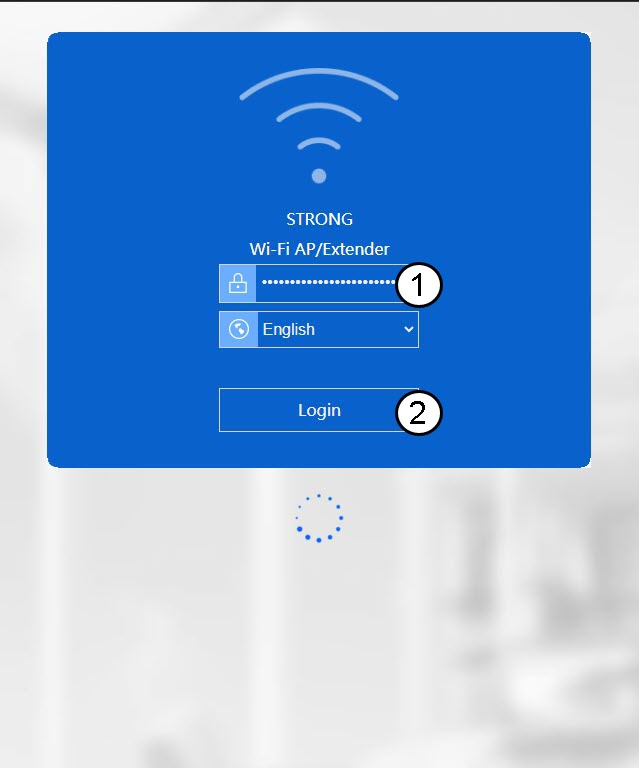
3. Přihlastese do webového uživatelského rozhraní
Zadejte heslo a klikněte na „Přihlásit se“.
4. ZjistěteIP adresu stránky Repeater
V informacích o zařízení vyhledejte IP adresu zařízení repeater
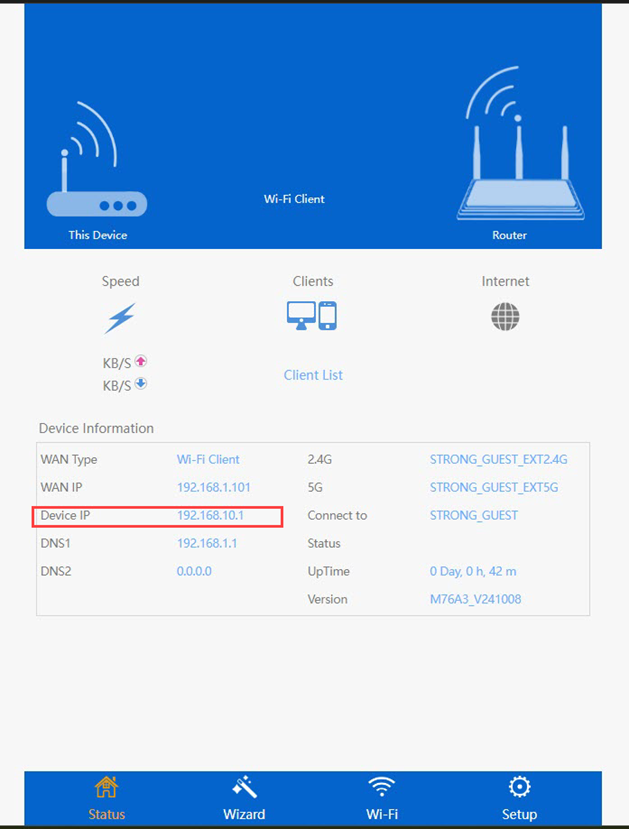
TIP: IP adresa vašeho zařízení repeater se změní, jakmile je nakonfigurováno pro připojení k Wi-Fi hostiteli.