5G AIRHOME 1050 | Wi-Fi 6
Ei löytynyt kohteita.
Ei löytynyt kohteita.
Kaikki kysymykset
5G AIRHOME 1050 | Wi-Fi 6
Ei löytynyt kohteita.
Ei löytynyt kohteita.
Miten vaihdan järjestelmänvalvojan salasanan?

Varoitus: Huomaa, että järjestelmänvalvojan käyttäjätunnusta ei voi muuttaa. Voit muuttaa vain salasanaa.
1. Yhdistälaitteeseen
Jotta voit päivittää järjestelmänvalvojan salasanan, sinun on muodostettava yhteys laitteesi Wi-Fi-verkkoon.

2Siirryverkkokäyttöliittymään
Syötä sitten selaimeesi seuraava IP-osoite: 168.0.1.

3Kirjaudu sisään
Syötä käyttäjätunnus ja salasana. Napsauta sitten Kirjaudu sisään.

4Käyttäjienhallinta
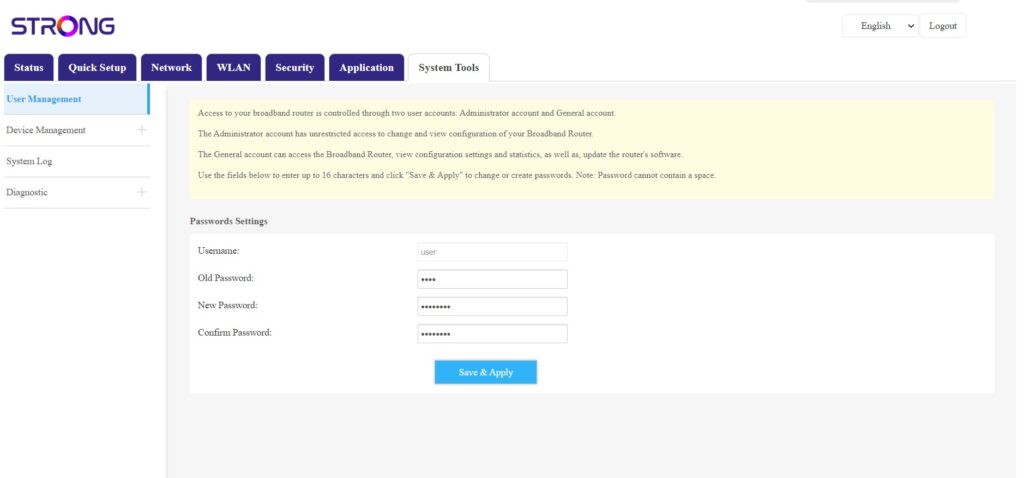
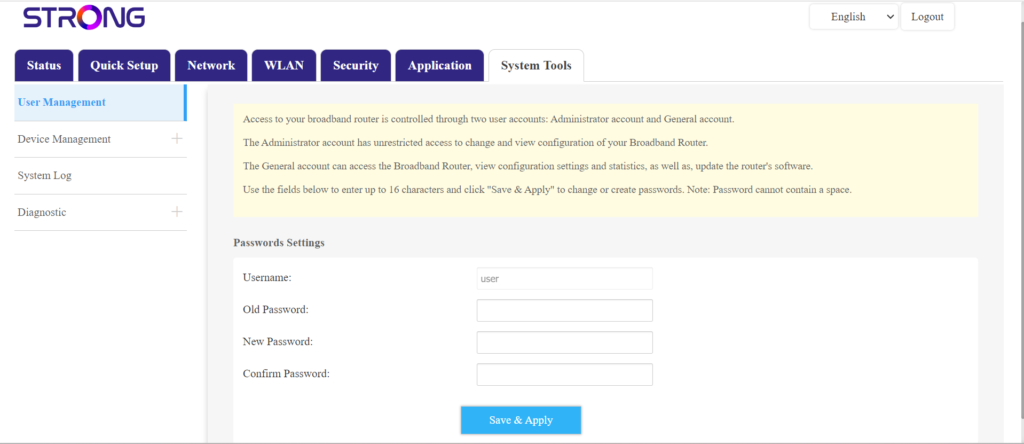
Kun tämä on tehty, napsauta ”Järjestelmätyökalut” ja ”Käyttäjien hallinta”
5Vaihdasalasana
Syötä seuraavat tiedot kenttiin ennen kuin napsautat Tallenna ja ota käyttöön:
- Vanha salasana: Kirjoita nykyinen salasana, jota käytit kirjautuessasi verkkokäyttöliittymään.
- Uusi salasana: Anna uusi salasana, jotta voit kirjautua verkkokäyttöliittymään.
- Salasanan vahvistus: Kirjoita sama salasana kuin ”Uusi salasana” -kenttään.