4G AIRHOME 310 irrotettavilla 4G-antenneilla
Ei löytynyt kohteita.
Ei löytynyt kohteita.
Kaikki kysymykset
4G AIRHOME 310 irrotettavilla 4G-antenneilla
Ei löytynyt kohteita.
Ei löytynyt kohteita.
Mitä voin tehdä verkkokäyttöliittymässä?
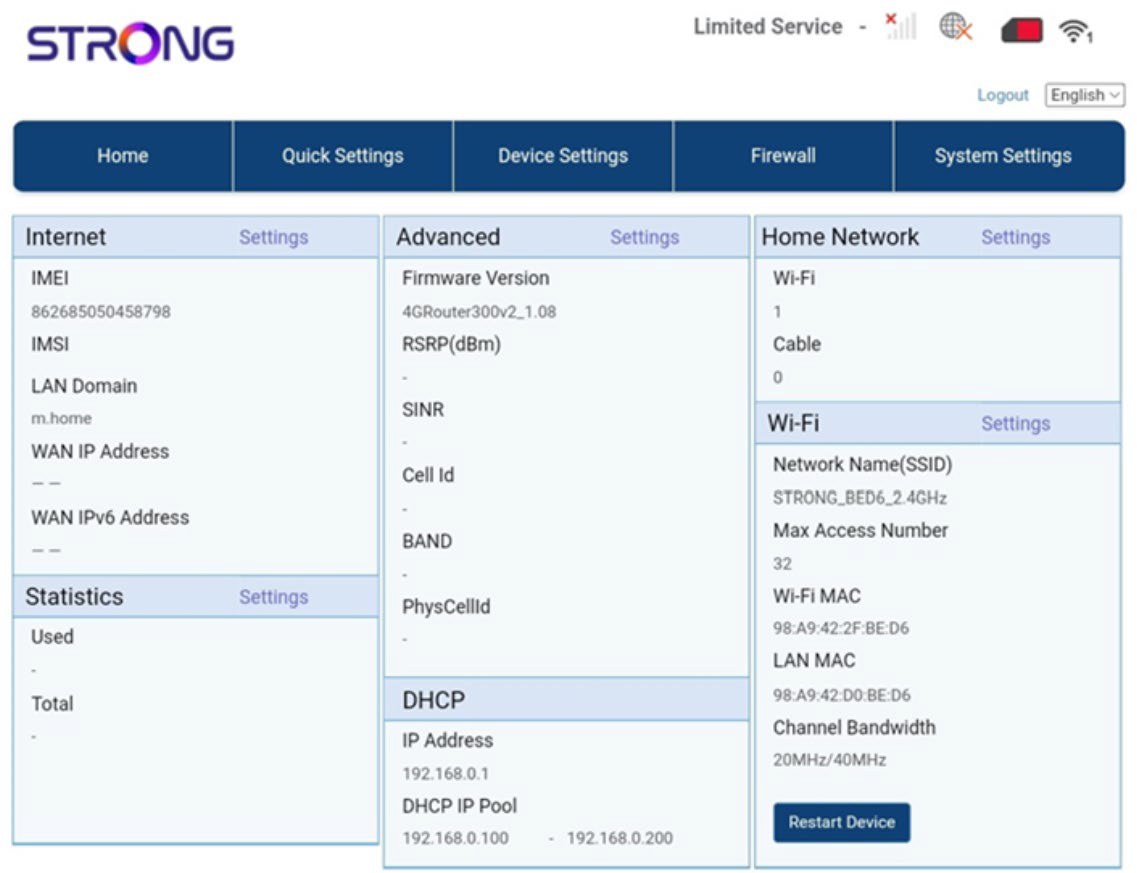
Verkkokäyttöliittymä on jaettu viiteen osioon:
• Etusivu: täältä näet reitittimesi tärkeimmät tiedot, kuten internetyhteyden tilan, laiteohjelmistoversion, IP-osoitteen sekä tiedot Wi-Fi-verkosta ja kotiverkosta jne.
• Pikasetukset: täältä voit muokata SSID-tunnusta ja salasanaa.
• Laiteasetukset: täältä näet kytkettyjen laitteiden lukumäärän sekä voit hallita IP-osoiteasetuksia, PIN-koodeja, antenniasetuksia, Wi-Fi-asetuksia, internetasetuksia jne.
• Palomuuri: täältä voit määrittää suojausasetukset.
• Järjestelmäasetukset: täältä voit päivittää, käynnistää laitteen uudelleen tai muokata asetuksia.
Lisäksi voit tarkastella Wi-Fi-verkon, matkapuhelinverkon ja datan tilaa.