5G AIRHOME 1050 | Wi-Fi 6
Nema pronađenih stavki.
Nema pronađenih stavki.
Sva pitanja
5G AIRHOME 1050 | Wi-Fi 6
Nema pronađenih stavki.
Nema pronađenih stavki.
Kako mogu promijeniti administratorsku lozinku?

Upozorenje : imajte na umu da nije moguće promijeniti administratorsko korisničko ime. Možete promijeniti samo lozinku.
1. Spojite se s uređajem
Za ažuriranje administratorske lozinke morate se povezati s Wi-Fi mrežom svog uređaja.

2 Pristup web sučelju
Zatim unesite sljedeću IP adresu: 168.0.1 u svoj preglednik.

3 Prijava
Morate unijeti korisničko ime i lozinku. Zatim kliknite Prijava.

4 Upravljanje korisnicima
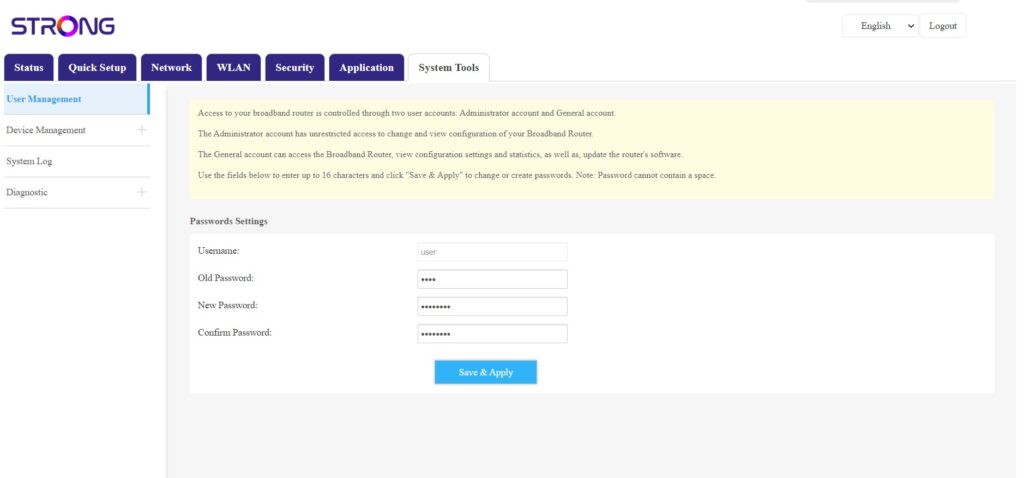
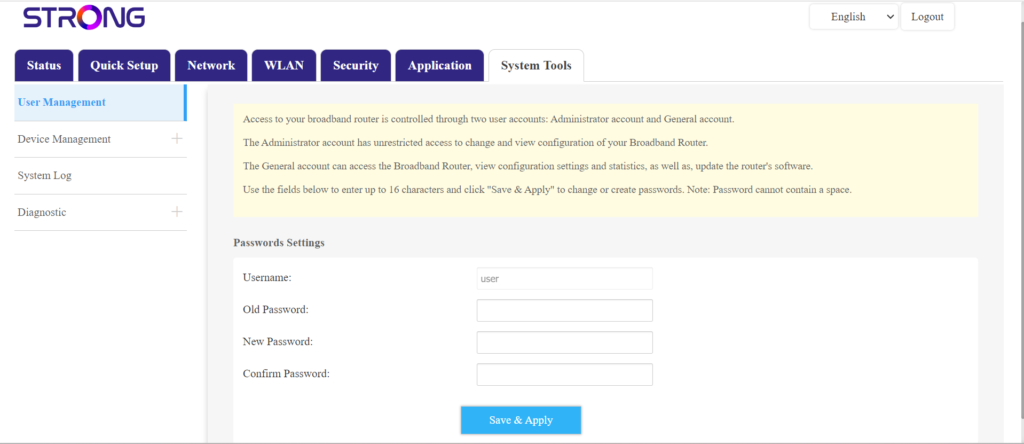
Nakon što to učinite, kliknite Alati sustava i Upravljanje korisnicima
5 Promjena lozinke
Prije nego što kliknete Spremi i primijeni, unesite sljedeće podatke u polja:
- Stara lozinka : Unesite trenutnu lozinku koju ste koristili za povezivanje s web-sučeljem.
- Nova lozinka : Unesite novu lozinku za povezivanje s web-sučeljem.
- Potvrđena lozinka: Unesite istu lozinku kao u polje Nova lozinka.