5G AIRHOME 1050 | Wi-Fi 6
Geen items gevonden.
Geen items gevonden.
Alle vragen
5G AIRHOME 1050 | Wi-Fi 6
Geen items gevonden.
Geen items gevonden.
Hoe wijzig ik het beheerderswachtwoord?

Waarschuwing: houd er rekening mee dat het niet mogelijk is om de gebruikersnaam van de beheerder te wijzigen. Je kunt alleen het wachtwoord wijzigen.
1Maak verbindingmet het apparaat
Om het beheerderswachtwoord te wijzigen, moet u verbinding maken met het wifi-netwerk van uw apparaat.

2. Opende webinterface
Voer vervolgens het volgende IP-adres in je browser in: 168.0.1.

3Inloggen
U moet de gebruikersnaam en het wachtwoord invoeren . Klik vervolgens op ‘Inloggen’.

4. Gebruikersbeheer
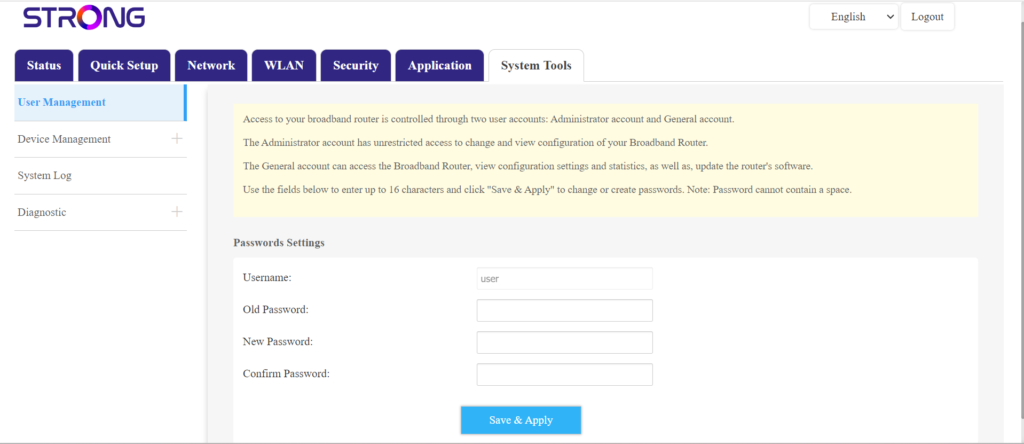
Zodra dit is gebeurd, klik je op Systeemhulpprogramma’s en Gebruikersbeheer
5Wachtwoord wijzigen
Vul de volgende gegevens in de velden in voordat u op ‘Opslaan en toepassen’ klikt:
- Oud wachtwoord: Voer het huidige wachtwoord in dat u hebt gebruikt om verbinding te maken met de webinterface.
- Nieuw wachtwoord: Voer een nieuw wachtwoord in om verbinding te maken met de webinterface.
- Wachtwoord bevestigen: Voer hetzelfde wachtwoord in als in het veld ‘Nieuw wachtwoord’.