4G AIRHOME 310 met afneembare 4G-antennes
Alle vragen
4G AIRHOME 310 met afneembare 4G-antennes
Wat kan ik doen in de webinterface?
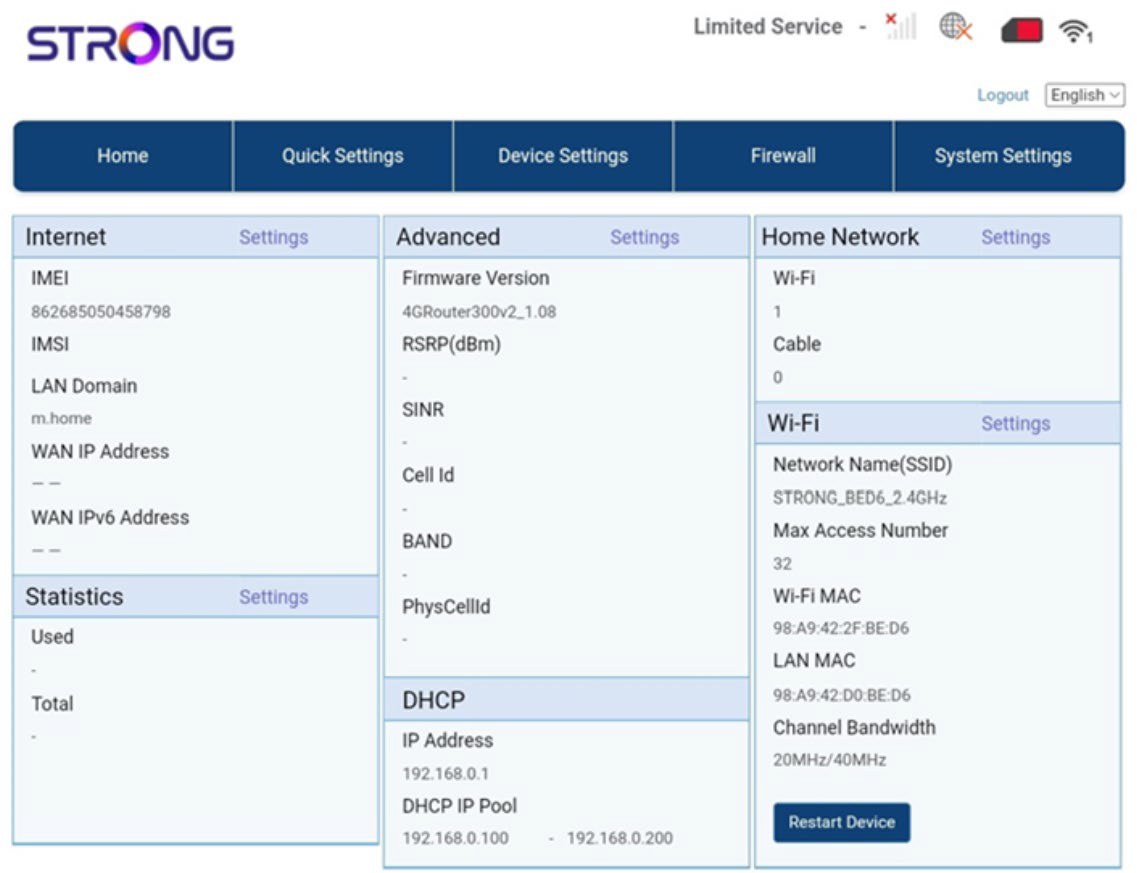
De webinterface is onderverdeeld in 5 onderdelen:
• Home: hier vindt u de belangrijkste informatie over uw router, zoals de status van de internetverbinding, de firmwareversie, het IP-adres, informatie over het wifi-netwerk en het thuisnetwerk, enzovoort...
• Snelle instellingen: hier kunt u uw SSID en wachtwoord wijzigen.
• Apparaatinstellingen: hier kunt u het aantal verbonden apparaten bekijken en instellingen voor IP-adressen, pincodes, antennes, wifi en internet beheren, enzovoort.
• Firewall: hier kunt u beveiligingsparameters instellen.
• Systeeminstellingen: hier kunt u updates uitvoeren, het systeem opnieuw opstarten of uw instellingen aanpassen.
Daarnaast kunt u ook de status van het wifi-netwerk, het mobiele netwerk en de data bekijken.