5G AIRHOME 1050 | Wi-Fi 6
Nenašli sa žiadne položky.
Nenašli sa žiadne položky.
Všetky otázky
5G AIRHOME 1050 | Wi-Fi 6
Nenašli sa žiadne položky.
Nenašli sa žiadne položky.
Ako môžem zmeniť heslo správcu?

Upozornenie: vezmite prosím na vedomie, že nie je možné zmeniť používateľské meno správcu. Zmeniť môžete iba heslo.
1. Pripojtesa k zariadeniu
Ak chcete aktualizovať heslo správcu, musíte sa pripojiť k sieti Wi-Fi vášho zariadenia.

2. Otvortewebové používateľské rozhranie
Potom do prehliadača zadajte nasledujúcu IP adresu: 168.0.1.

3Prihlásenie
Musíte zadať používateľské meno a heslo. Potom kliknite na „Prihlásiť sa“.

4Správa používateľov
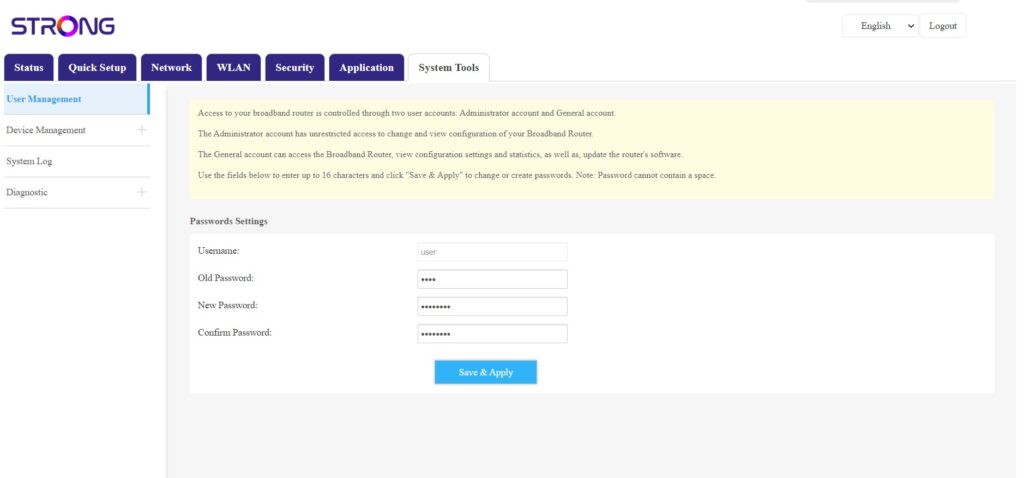
Akonáhle to urobíte, kliknite na položky „Systémové nástroje“ a „Správa používateľov“
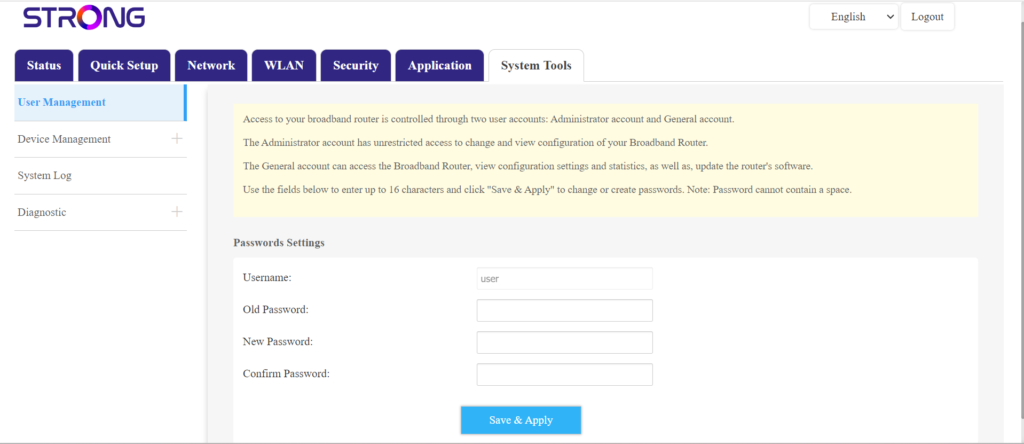
5Zmeniťheslo
Pred kliknutím na tlačidlo „Uložiť a použiť“ zadajte do polí nasledujúce informácie:
- Staré heslo: Zadajte aktuálne heslo, ktoré ste použili na prihlásenie do webového rozhrania.
- Nové heslo: Zadajte nové heslo na prihlásenie do webového rozhrania.
- Potvrdenie hesla: Zadajte rovnaké heslo ako v poli „Nové heslo“.