4G+ AIRHOME 710 s odnímateľnými 4G+ anténami
Nenašli sa žiadne položky.
Nenašli sa žiadne položky.
Všetky otázky
4G+ AIRHOME 710 s odnímateľnými 4G+ anténami
Nenašli sa žiadne položky.
Nenašli sa žiadne položky.
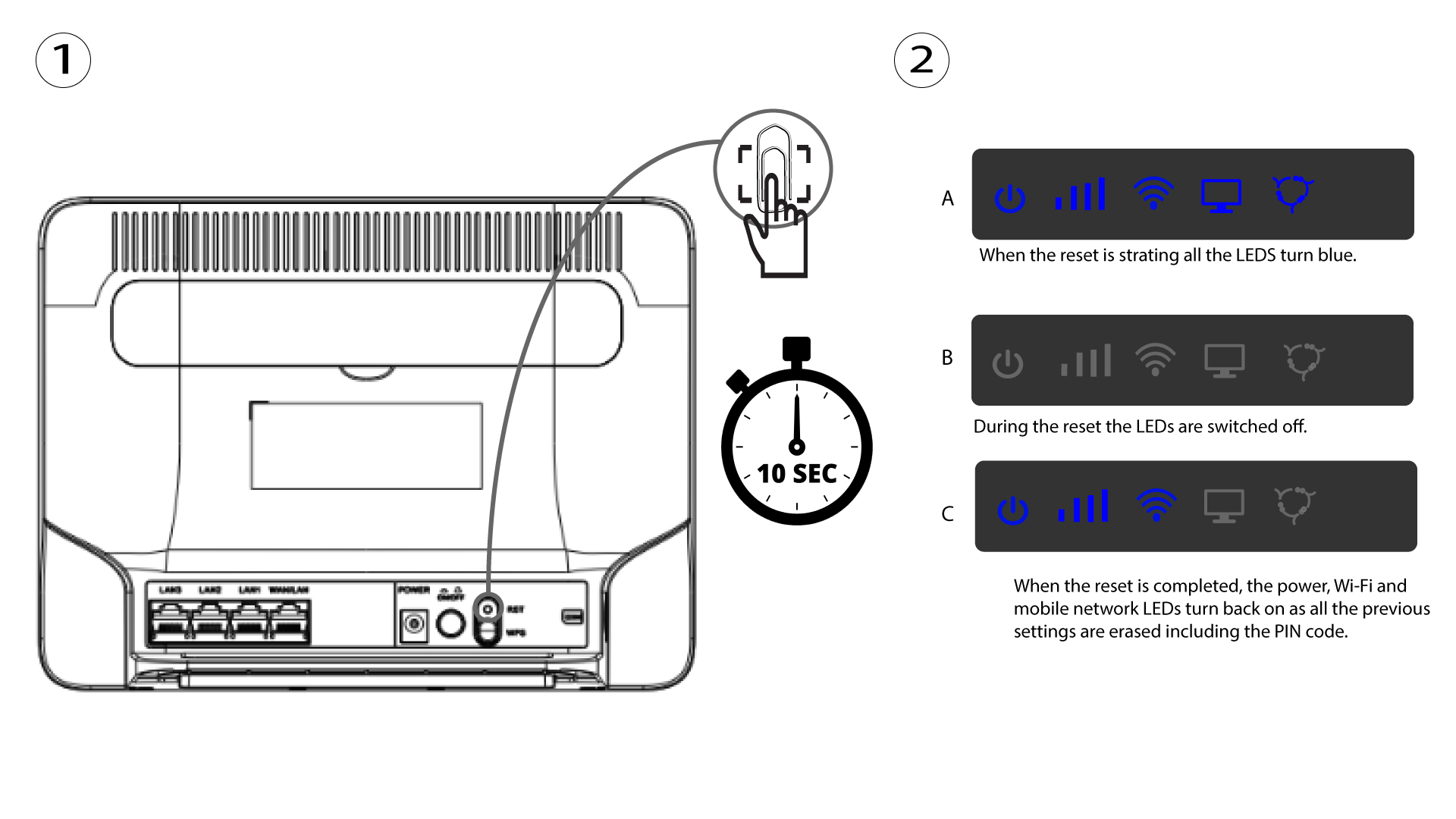
Ako môžem obnoviť továrenské nastavenia routera? (Tlačidlo Reset)
Niekedy sa môže stať, že vaše zariadenie nefunguje správne a nemáte prístup k internetu. V takomto prípade odporúčame obnoviť továrenské nastavenia zariadenia a v prípade potreby ho následne aktualizovať.
Máte na výber dva spôsoby: zariadenie môžete obnoviť stlačením tlačidla na obnovenie alebo prostredníctvom webového rozhrania.
PRÍPAD 1: Tlačidlo na vynulovanie.
Na to vložte do otvoru kancelársku sponku, aby ste stlačili tlačidlo resetovania. Tlačidlo resetovania držte stlačené 10 sekúnd. LED diódy zhasnú switch a opäť sa rozsvietia.