4G AIRHOME 310 са одвојивим 4G антенама
Нема пронађених ставки.
Нема пронађених ставки.
Сва питања
4G AIRHOME 310 са одвојивим 4G антенама
Нема пронађених ставки.
Нема пронађених ставки.
Шта могу да урадим у веб интерфејсу?
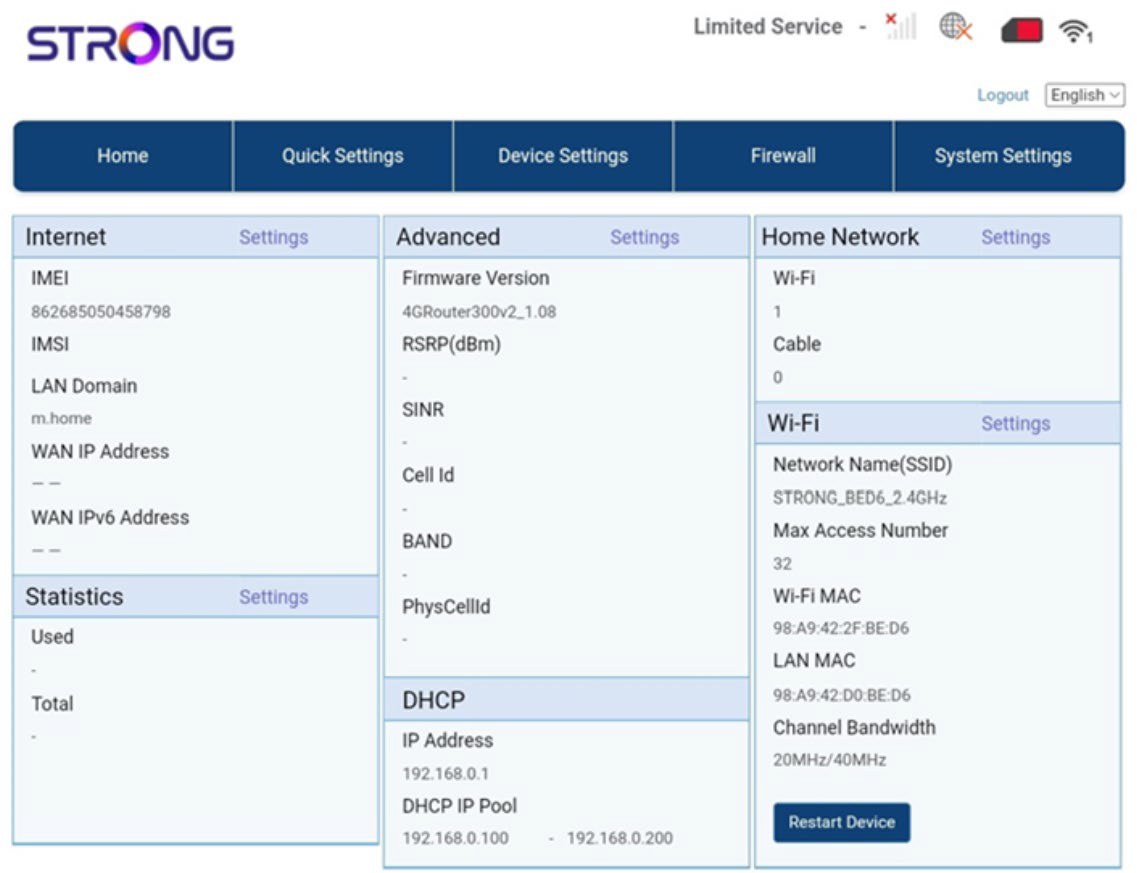
Веб кориснички интерфејс је подељен на 5 делова:
• Почетна: где можете видети главне информације о вашем рутеру, које одговарају статусу интернет везе, верзији фирмвера, IP адреси, информацијама о Wi-Fi мрежи и кућној мрежи итд...
• Брза подешавања: где можете да измените свој SSID и лозинку.
• Подешавања уређаја: где можете видети број повезаних уређаја, управљати подешавањима IP адресе, PIN кодовима, подешавањима антене, подешавањима Wi-Fi мреже, подешавањима интернета итд.
• Заштитни зид: где можете подесити безбедносне параметре.
• Системска подешавања: где можете ажурирати, поново покренути систем или изменити подешавања.
Поред тога, можете видети и статус Wi-Fi мреже, мобилне мреже и података.