5G AIRHOME 1050 | Wi-Fi 6
Aucun élément n'a été trouvé.
Aucun élément n'a été trouvé.
Toutes les questions
5G AIRHOME 1050 | Wi-Fi 6
Aucun élément n'a été trouvé.
Aucun élément n'a été trouvé.
Comment puis-je modifier le mot de passe administrateur ?

Avertissement: veuillez noter qu'il n'est pas possible de modifier le nom d'utilisateur de l'administrateur. Vous ne pouvez modifier que le mot de passe.
1. Connectez-vousà l'appareil
Pour mettre à jour le mot de passe administrateur, vous devez vous connecter au réseau Wi-Fi de votre appareil.

2Accéder àl'interface utilisateur Web
Saisissez ensuite l'adresse IP suivante : 168.0.1 dans votre navigateur.

3Connexion
Vous devez saisir votre nom d'utilisateur et votre mot de passe. Cliquez ensuite sur « Connexion ».

4. Gestion des utilisateurs
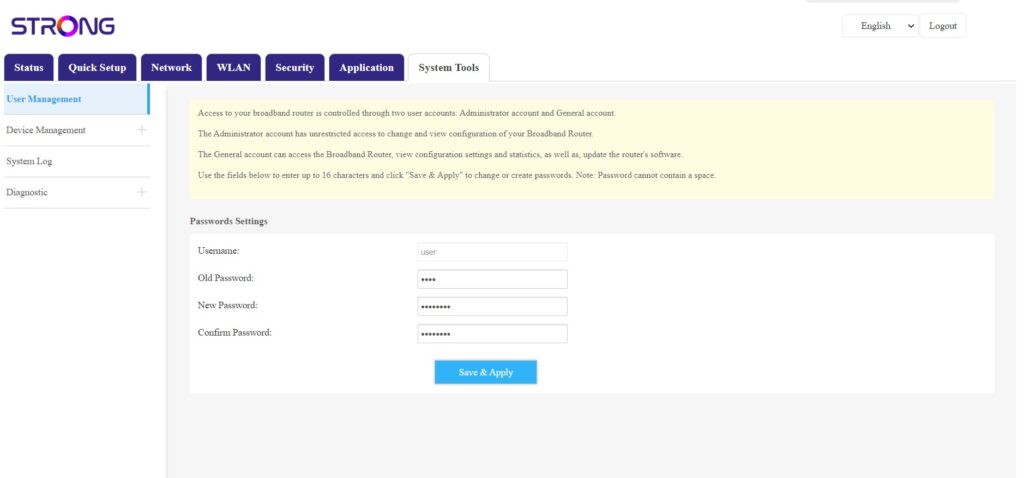
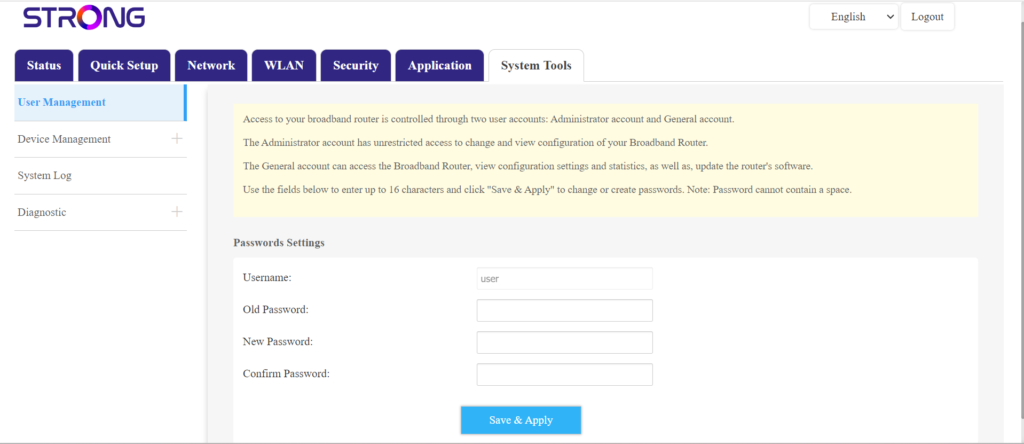
Une fois cette opération effectuée, cliquez sur « Outils système » puis sur « Gestion des utilisateurs ».
5Modifierle mot de passe
Saisissez les informations suivantes dans les champs, puis cliquez sur « Enregistrer et appliquer » :
- Ancien mot de passe: saisissez le mot de passe actuel que vous avez utilisé pour vous connecter à l'interface utilisateur Web.
- Nouveau mot de passe: saisissez un nouveau mot de passe pour vous connecter à l'interface utilisateur Web.
- Confirmation du mot de passe : saisissez le même mot de passe que celui indiqué dans le champ « Nouveau mot de passe ».