
4G AIRHOME 200 Mini ruter s odvojivim 4G antenama
Sva pitanja
4G AIRHOME 200 Mini ruter s odvojivim 4G antenama
Kako mogu provjeriti i urediti postavke APN-a svog davatelja usluga?
Kada uređaj ne prepoznaje vašu SIM karticu automatski, morate se prijaviti na web sučelje kako biste provjerili postavke APN-a i uredili ih po potrebi. Postavke APN-a vašeg davatelja usluga mogu se
možete pronaći izravno na njihovoj web stranici ili ih možete zatražiti od službe za podršku vašeg davatelja usluga.
1. Povežite se s Wi-Fi mrežom vašeg rutera
Morate se povezati s web-sučeljem. Da biste to učinili, unesite SSID (naziv Wi-Fi mreže) i lozinku za Wi-Fi usmjerivač u svoj uređaj.

2. Pregledajte IP adresu web sučelja
Zatim unesite sljedeću IP adresu u svoj preglednik: 192.168.188.1

3 Unesite svoje vjerodajnice
Morate unijeti lozinku . Zatim kliknite Prijava .

4 Postavke mreže
Kliknite Postavke mreže .

5. Potražite informacije o APN-u svog davatelja usluga
Potražite postavke APN-a na web stranici svog davatelja usluga. Morate zapisati sljedeće podatke:
- Ime
- APN
- Korisničko ime
- Lozinka
- Autentifikacija
6. Izradite ručni APN
Ako su podaci netočni, kliknite APN , a zatim Ručno i Dodaj novo .
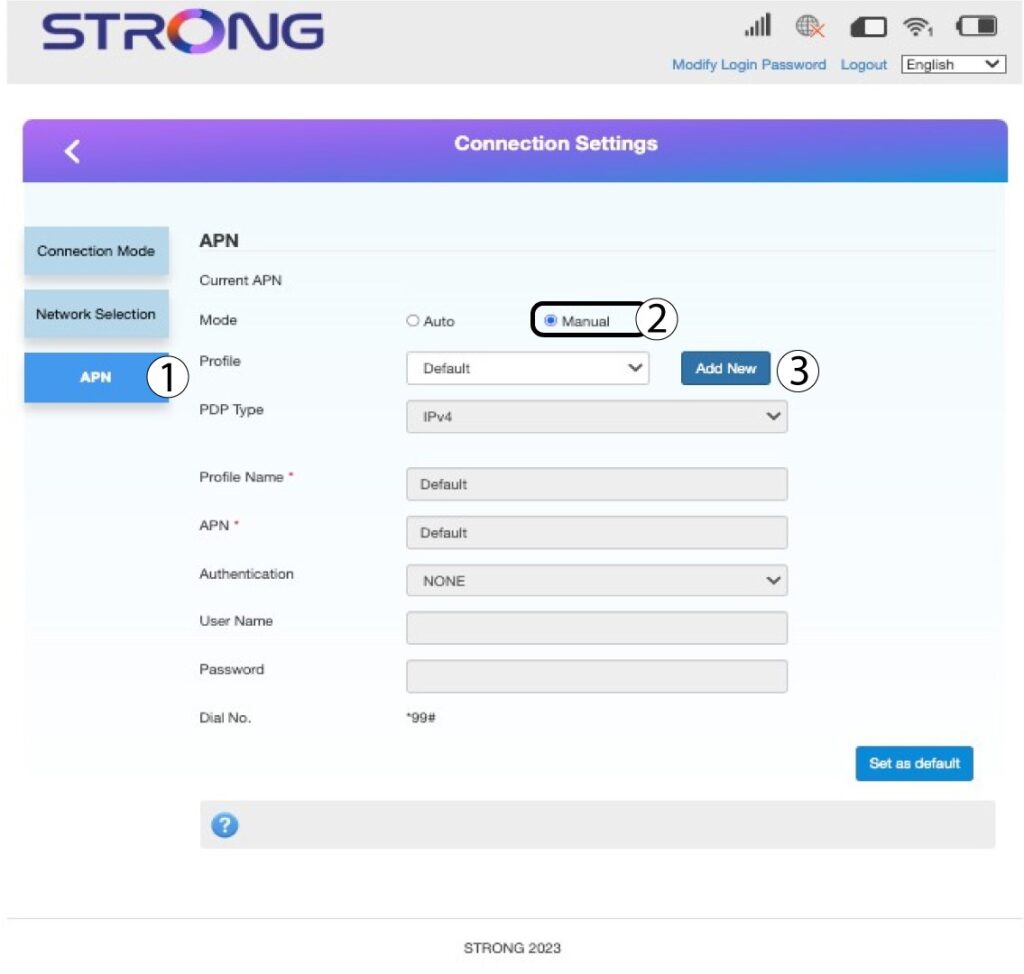
7 Unesite podatke o APN-u
Unesite sljedeće podatke prije nego što kliknete Postavi kao zadano :
- Vrsta PDP-a : odaberite IPv4 kao vrijednost Vrsta PDP-a.
- Naziv profila : unesite naziv svog pružatelja usluga.
- APN : unesite APN adresu .
- Vrsta autentifikacije : Odaberite vrstu autentifikacije koju je definirao vaš davatelj usluga za vaš APN između sljedećih vrijednosti (NONE, CHAP, PAP)
