4G AIRSPOT 220 Wi-Fi kijelzővel
Nem találtunk tárgyakat.
Nem találtunk tárgyakat.
Minden kérdés
4G AIRSPOT 220 Wi-Fi kijelzővel
Nem találtunk tárgyakat.
Nem találtunk tárgyakat.
Hogyan lehet be- és kikapcsolni a készüléket?
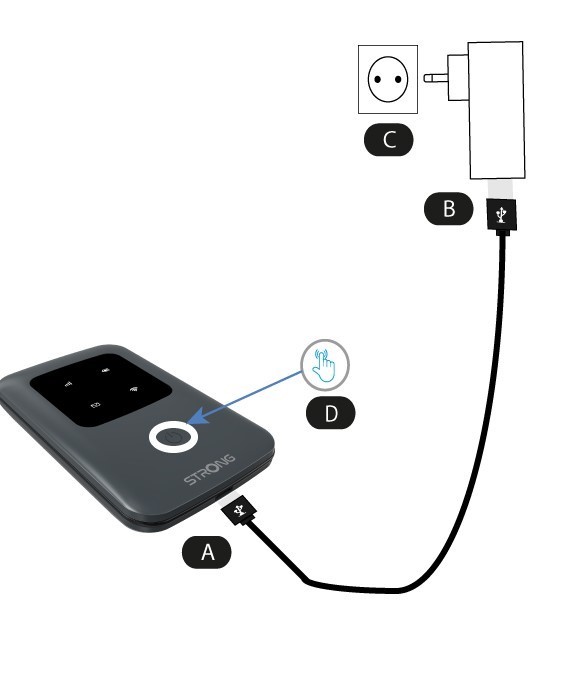
A készülék bekapcsolásához használat előtt fel kell tölteni. Ehhez csatlakoztassa az USB-kábelt a készülékhez (A), majd dugja be a csatlakozót (B).
1Bekapcsológomb
Csatlakoztassa az USB-kábelt a készülékhez (A) és a tápegységhez (B). Ezután dugja be a konnektorba (C), majd tartsa lenyomva a bekapcsológombot öt másodpercig (D).
Néhány másodperc múlva a készülék LED-jei kigyulladnak.
A kikapcsoláshoz egyszerűen csak 5 másodpercig nyomva kell tartani a bekapcsológombot.