4G AIRHOME 310 con antenne 4G rimovibili
Tutte le domande
4G AIRHOME 310 con antenne 4G rimovibili
Cosa posso fare nell'interfaccia utente web?
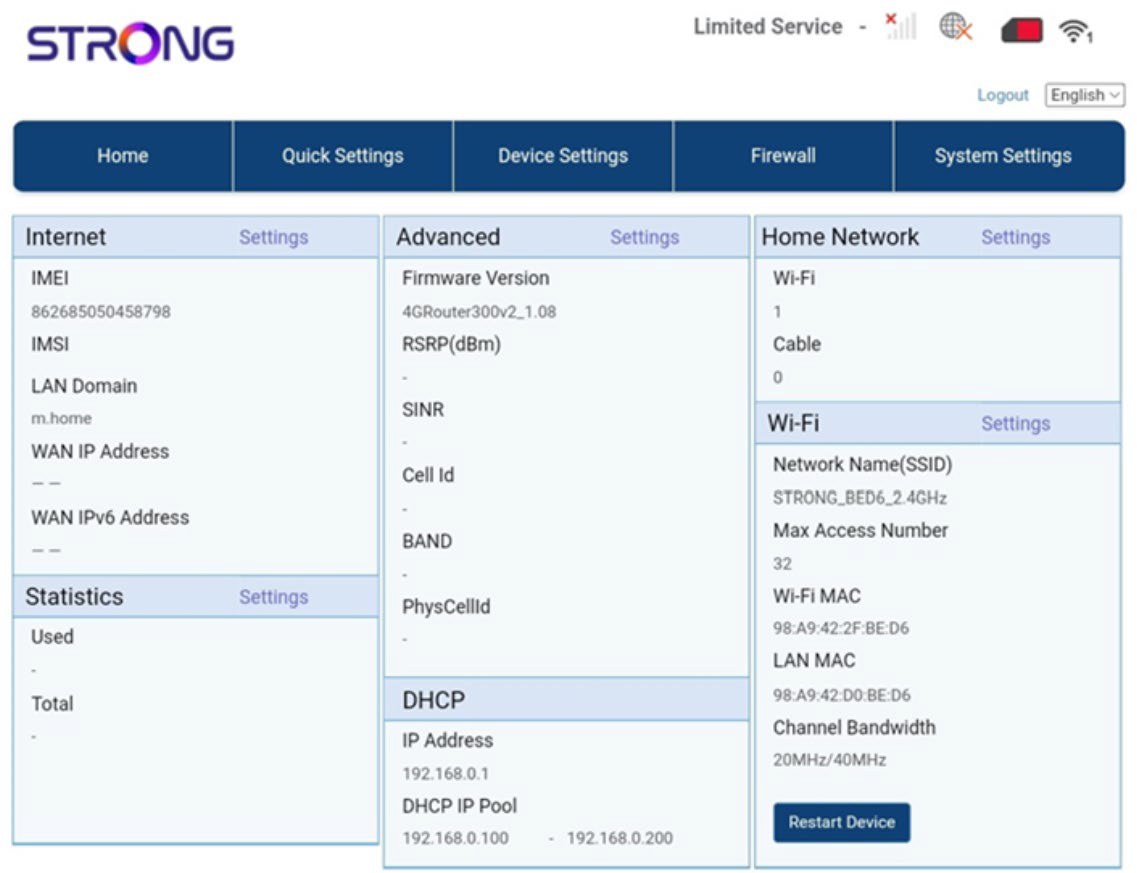
L'interfaccia utente web è suddivisa in 5 sezioni:
• Home: qui puoi visualizzare le informazioni principali relative al tuo router, quali lo stato della connessione a Internet, la versione del firmware, l’indirizzo IP, le informazioni sulla rete Wi-Fi e sulla rete domestica, e così via...
• Impostazioni rapide: qui puoi modificare l’SSID e la password.
• Impostazioni dispositivo: qui puoi visualizzare il numero di dispositivi connessi, gestire le impostazioni dell’indirizzo IP, i codici PIN, le impostazioni dell’antenna, le impostazioni Wi-Fi, le impostazioni Internet, ecc.
• Firewall: qui puoi configurare i parametri di sicurezza.
• Impostazioni di sistema: qui puoi aggiornare, riavviare o modificare le tue impostazioni.
Inoltre, puoi anche visualizzare lo stato della rete Wi-Fi, della rete mobile e dei dati.