5G AIRHOME 1050 | Wi-Fi 6
Nebyly nalezeny žádné položky.
Nebyly nalezeny žádné položky.
Všechny otázky
5G AIRHOME 1050 | Wi-Fi 6
Nebyly nalezeny žádné položky.
Nebyly nalezeny žádné položky.
Jak mohu změnit heslo správce?

Upozornění: mějte prosím na paměti, že uživatelské jméno správce nelze změnit. Můžete změnit pouze heslo.
1. Připojte sek zařízení
Chcete-li změnit heslo správce, musíte se připojit k Wi-Fi sítě svého zařízení.

2. Otevřetewebové uživatelské rozhraní
Poté zadejte do prohlížeče následující IP adresu: 168.0.1.

3Přihlášení
Je třeba zadat uživatelské jméno a heslo. Poté klikněte na „Přihlásit se“.

4Správa uživatelů
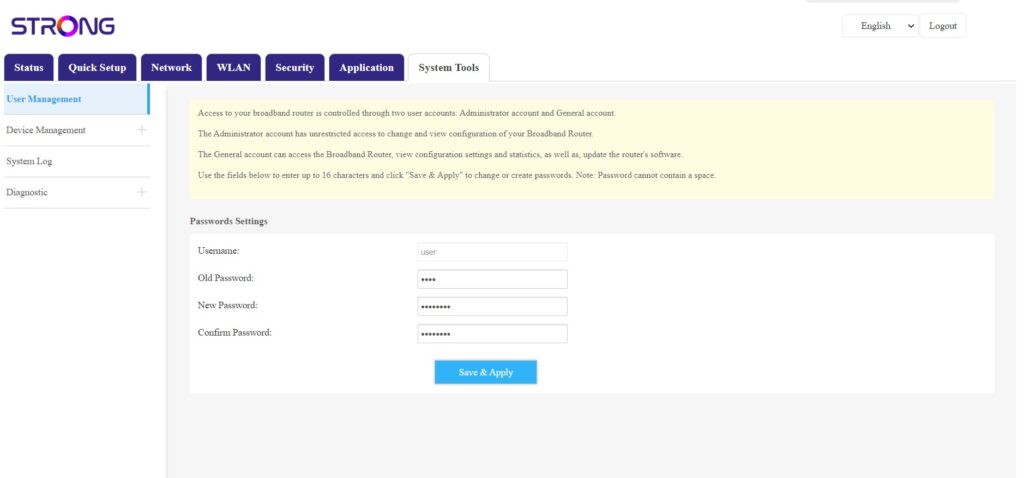
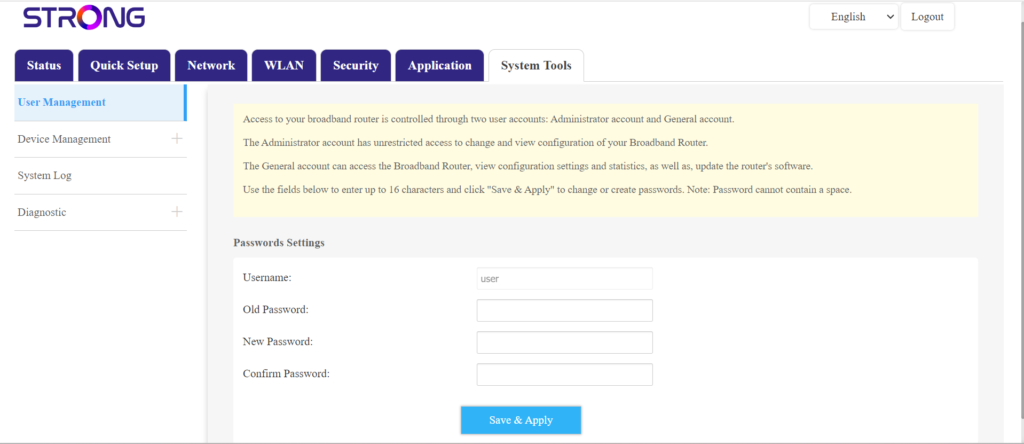
Jakmile to provedete, klikněte na položku „Systémové nástroje“ a „Správa uživatelů“
5Změnitheslo
Do polí zadejte následující údaje a poté klikněte na tlačítko „Uložit a použít“:
- Staré heslo: Zadejte aktuální heslo, které jste použili pro přihlášení do webového uživatelského rozhraní.
- Nové heslo: Zadejte nové heslo pro přihlášení do webového uživatelského rozhraní.
- Potvrzení hesla: Zadejte stejné heslo jako v poli „Nové heslo“.