Mesh Wi-Fi 6 ATRIA 3000 UK paquete de 2)
Todas las preguntas
Mesh Wi-Fi 6 ATRIA 3000 UK paquete de 2)
¿Cómo se utiliza la aplicación « Mesh » de Atria?
¿Cómo se utiliza la aplicación AtriaMesh?
1. Conéctatea la red Wi-Fi del dispositivo
Descarga la aplicación para smartphone«ATRIA MESH » en la App Store o en Google Play Store.

2. Accedea la dirección IP de la interfaz de usuario web
A continuación, debes conectarte con tu smartphone a la red Wi-Fi de Mesh y, después, iniciar sesión en la aplicación con tus credenciales, que deberían ser«admin» y«admin» si no las has cambiado.

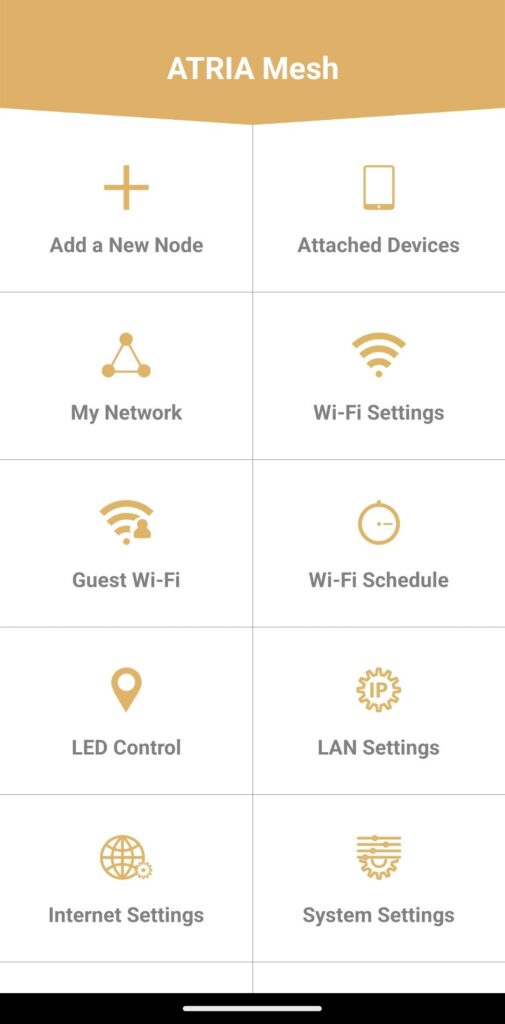
3. Menú principal
Ahora estás en la página principal.
• Añadir un nuevo nodo: aquí puedes añadir una nueva unidad Mesh a tu red Mesh .
• Dispositivos conectados: aquí puedes comprobar qué dispositivos están conectados a tu red Mesh .
• Mi red: aquí puedes consultar todas las unidades Mesh conectadas a tu red Mesh .
• Ajustes de Wi-Fi: aquí puedes editar y modificar el SSID (nombre de la red Wi-Fi) y la contraseña de tu red Wi-Fi Mesh .
• Wi-Fi para invitados: aquí puedes configurar una red Wi-Fi para invitados de 2,4 GHz o 5 GHz.
• Programación de Wi-Fi: aquí puedes programar un periodo de tiempo de activación para tu red Wi-Fi.
• Control de LED: aquí puedes encender o apagar los LED de tu unidad « Mesh ».
• Ajustes de LAN: aquí puedes activar o desactivar el DHCP.
• Ajustes de Internet: aquí puedes configurar una conexión DHCP, un DNS manual, un PPPoE y establecer una IP estática.
• Ajustes del sistema: aquí puedes modificar el nombre de usuario y la contraseña de administración para acceder a la aplicación.