4G AIRHOME 310 s odnímateľnými 4G anténami
Nenašli sa žiadne položky.
Nenašli sa žiadne položky.
Všetky otázky
4G AIRHOME 310 s odnímateľnými 4G anténami
Nenašli sa žiadne položky.
Nenašli sa žiadne položky.
Čo môžem robiť v webovom rozhraní?
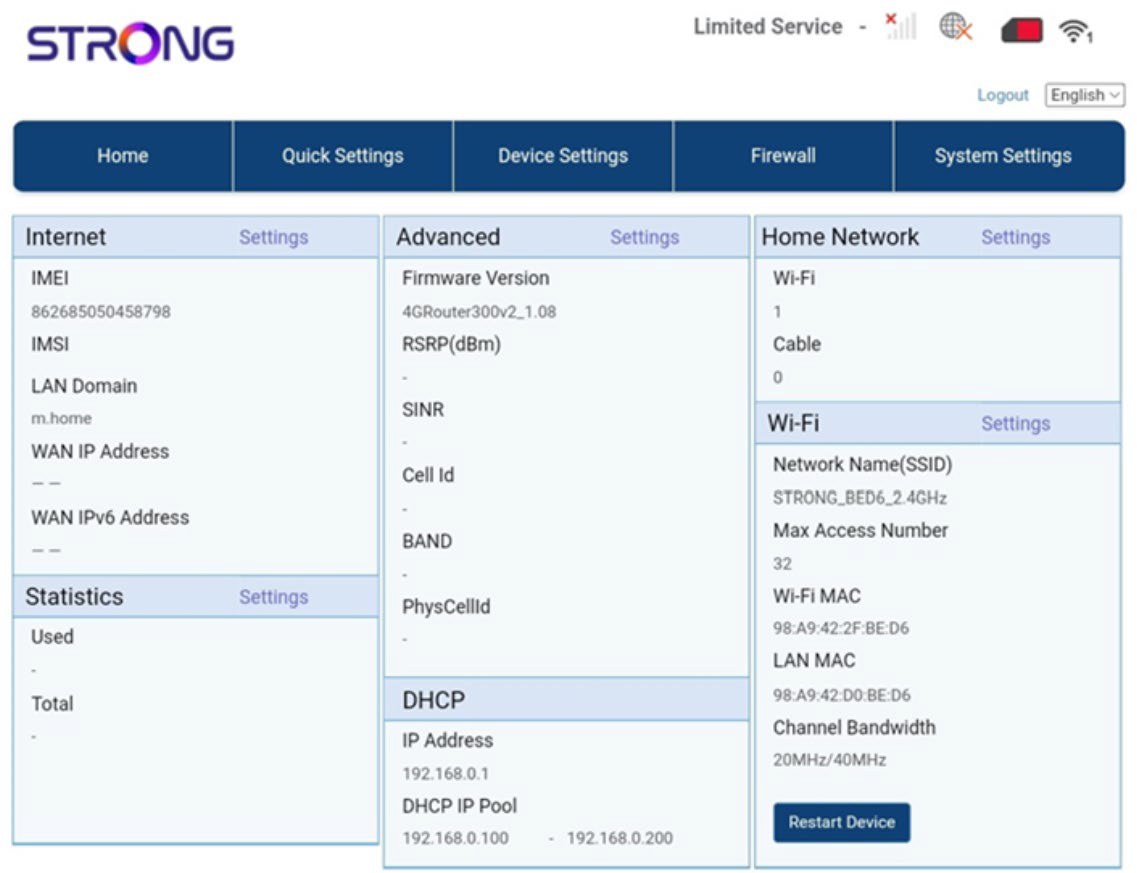
Webové používateľské rozhranie je rozdelené do 5 častí:
• Domovská stránka: tu nájdete hlavné informácie o vašom routeri, ako napríklad stav internetového pripojenia, verziu firmvéru, IP adresu, informácie o sieti Wi-Fi a domácej sieti atď...
• Rýchle nastavenia: tu môžete upravovať svoje SSID a heslo.
• Nastavenia zariadení: tu môžete vidieť počet pripojených zariadení, spravovať nastavenia IP adries, PIN kódy, nastavenia antény, nastavenia Wi-Fi, nastavenia internetu atď.
• Firewall: tu môžete nastaviť bezpečnostné parametre.
• Systémové nastavenia: tu môžete aktualizovať, reštartovať alebo upravovať svoje nastavenia.
Okrem toho tu môžete vidieť aj stav siete Wi-Fi, mobilnej siete a dát.