4G AIRSPOT 220 Мобилни Wi-Fi са екраном
Нема пронађених ставки.
Нема пронађених ставки.
Сва питања
4G AIRSPOT 220 Мобилни Wi-Fi са екраном
Нема пронађених ставки.
Нема пронађених ставки.
Како да укључим и искључим уређај?
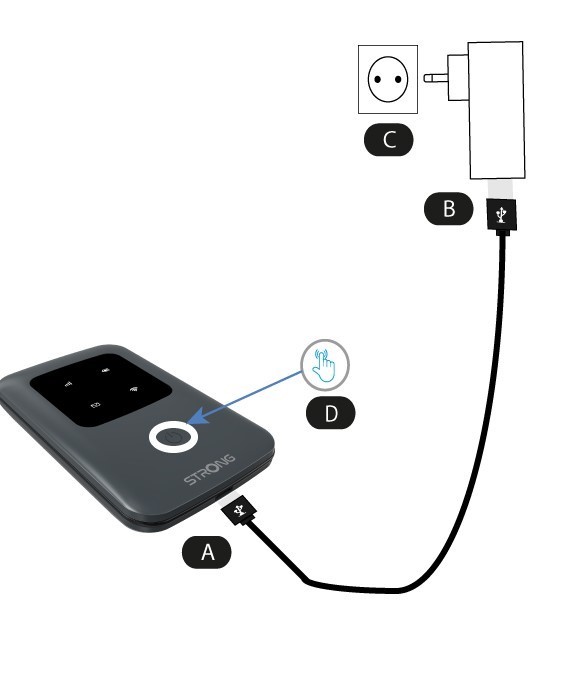
Да бисте укључили уређај, морате га напунити пре употребе. Да бисте то урадили, уметните USB кабл у уређај (А) и утикач (Б).
1 Дугме за напајање
Укључите USB кабл из уређаја (А) у напајање (Б). Затим га укључите у утичницу (Ц) и притисните и држите дугме за напајање пет секунди (Д) .
Након неколико секунди, ЛЕД диоде на уређају ће се упалити.
Да бисте га искључили, једноставно морате притиснути и држати дугме за напајање 5 секунди.