4G AIRSPOT 220 Мобилни Wi-Fi са екраном
Нема пронађених ставки.
Нема пронађених ставки.
Сва питања
4G AIRSPOT 220 Мобилни Wi-Fi са екраном
Нема пронађених ставки.
Нема пронађених ставки.
Шта могу да урадим у веб интерфејсу?
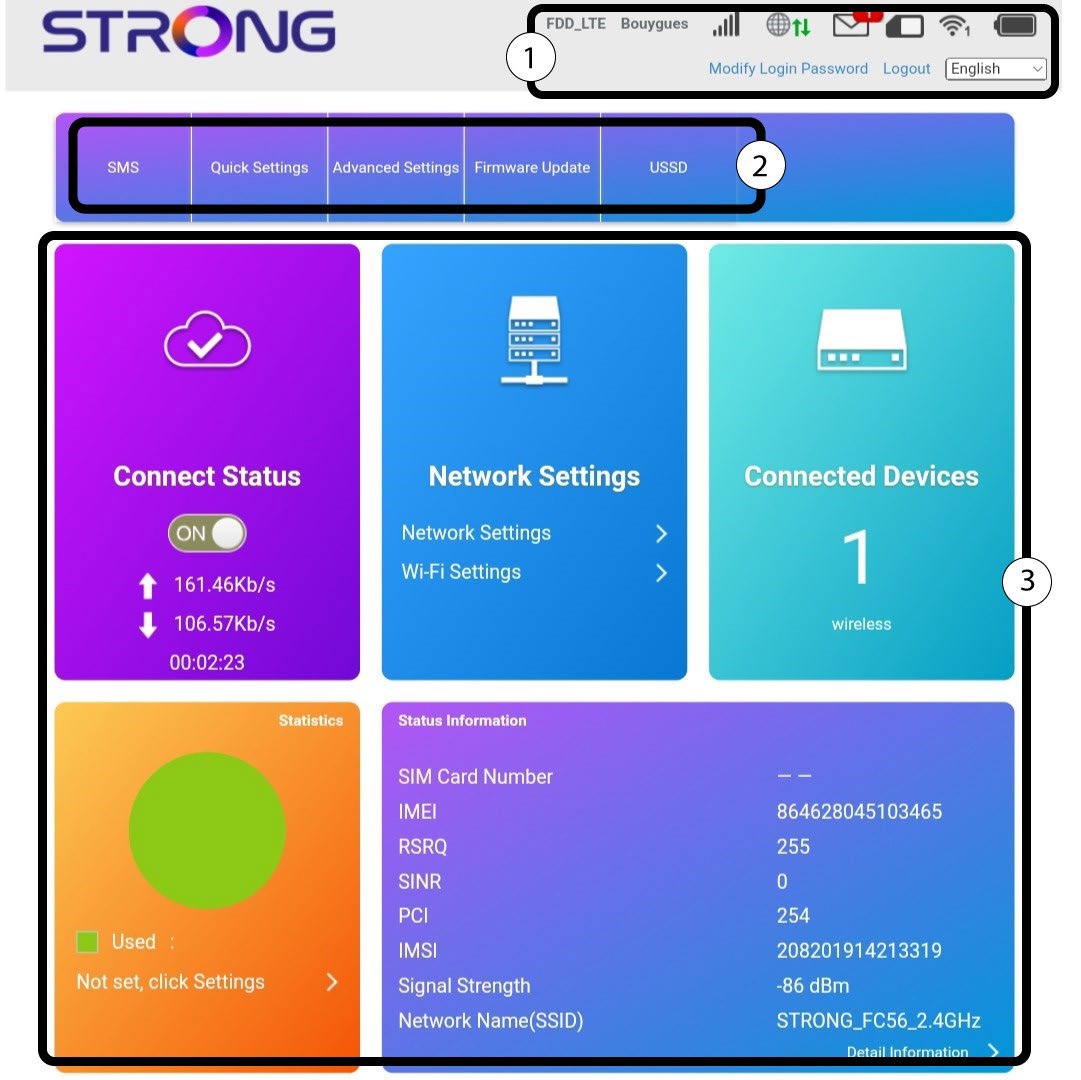
Веб кориснички интерфејс је организован у различите одељке:
- Први одељак се налази изнад горње траке менија и пружа информације о Wi-Fi мрежи, статусу SIM картице; покривености оператера, броју уређаја повезаних путем етернета, SMS-у и промени лозинке за пријаву.
- Други одељак је горња трака која садржи различите меније:
- СМС: где можете да видите и обришете СМС поруке примљене на СИМ картицу која се користи у уређају, као и да пошаљете СМС поруке својим контактима.
- Брза подешавања : где можете да измените свој SSID (назив Wi-Fi мреже) и лозинку за Wi-Fi.
- Напредна подешавања : где можете подесити подешавања напајања Wi-Fi мреже, заштитни зид (филтрирање портова, мапирање портова, прослеђивање портова, UPnP, DMZ), видети статус SD картице, ИП адресу рутера, ажурирати софтвер, изабрати опсег за интернет покривеност и креирати SNTP.
- Ажурирање фирмвера: где можете ажурирати уређај.
- USSD : где можете приступити информацијама о преосталим подацима вашег плана, на пример.
Главни део корисничког интерфејса који се састоји од 5 менија: Статус везе, Подешавања мреже, Повезани уређаји, Статистика и Информације о статусу. - Статус везе : где можете да искључите рутер са 4Г мреже и видите брзину отпремања и преузимања ваше везе.
- Мрежна подешавања: где можете подесити Wi-Fi подешавања (главни SSID, гостујући SSID, WPS, интернет Wi-Fi, напредна подешавања, WLAN MAC филтер) и мрежна подешавања (режим повезивања, избор мреже и APN)
- Повезани уређаји : где можете видети листу повезаних уређаја.
- Статистика: где можете подесити упозорење за количину података коришћених у вашем плану.